
- Simple questions sit in the analyst queue for days, because the same two or three people own every report.
- Prebuilt dashboards answer last quarter's questions. A new question means a new build.
- ERP, CRM, and spreadsheet data live in separate systems, so any cross-system question starts with a manual export.
- Two teams report two different "revenue" numbers, and the meeting turns into an argument about definitions.
- Staff paste exports into ChatGPT to get around the queue, which moves company data outside any control. AI Guardian covers that side of the problem.
AI data agent guide
AI Data Agent Software: How It Works Across ERP, CRM, and Databases
Business teams often know the question they need answered but not which report, table, or system contains the answer. An AI data agent lets them ask that question in plain English, translates it into a validated query, applies approved business definitions and permissions, and returns an answer that can be traced back to the underlying data.
At a glance
- 150+ organizations served
- 4-week delivery
- Runs in your cloud
- 20+ years in business
- 950+ projects delivered
- Same-day response
Why it matters
The value is not simply "chat with your database." It is reducing the dependency on analysts for repeat questions without letting an LLM guess what revenue, margin, active customer, or pipeline actually means.
This guide is written for heads of data and analytics, BI leaders, and CIOs, and for the finance, RevOps, and operations leaders whose teams wait on analysts for recurring questions. If your business teams need answers faster, but you don't want another AI interface giving them numbers nobody can verify, the sections below explain how AI data agents work, what makes their answers trustworthy, and how to evaluate one against your own schema.
What is an AI data agent?
Definition
An AI data agent is software that takes a business question in plain language, translates it into a validated query, runs it against connected company data sources, and returns a traceable answer with the underlying query, source, and metric definition available for verification. It applies the organization's metric definitions and access rules, so answers stay consistent and traceable.
Key takeaways
| Area | Takeaway |
|---|---|
| What it does | Turns business questions into validated queries against structured company data |
| What determines trust | Semantic definitions, access rules, and evaluation matter as much as model capability |
| Where it fits | Most useful when questions span systems or generate repeated analyst tickets |
| How to evaluate | Test against your schema, including wrong, ambiguous and unauthorized questions |
AI data agent vs AI agent
The main difference between an AI agent and an AI data agent is scope. A general AI agent plans multi-step work and calls whatever tools it has, such as email, ticketing, or code execution. An AI data agent has one job, answering questions from structured business data, and one main tool, the database.
That narrow scope makes it testable. Either the number is right, or it is not, and the query shows which.
Analytical vs operational data agents
Data agents fall into three groups, and the group decides the architecture.
| Type | What it answers | Typical question | Main requirement |
|---|---|---|---|
| Analytical | Trends, comparisons, history | "Which regions missed plan this quarter?" | Correct metric definitions |
| Operational | Current state of one record | "What is the status of work order 4471?" | Fresh data, record-level access |
| Action | Changes a record | "Apply this billing adjustment" | Approvals and rollback |
Talk to Your Data is an analytical agent. It reads and explains. Write-back to source systems is outside the 4-week package.
Why the term matters now
Gartner published its first Market Guide for Agentic Analytics on 9 February 2026. It describes agentic analytics as software that applies AI agents across the data-to-insight workflow, and it lists natural language query and data source connectivity among the must-have capabilities. Trust is the sticking point: InsightSoftware's 2026 survey of 114 data and analytics leaders found that only 51% trust AI-generated insights.
Gartner predicts that by 2028, 60% of agentic analytics projects relying solely on the Model Context Protocol (MCP) will fail for lack of a consistent semantic layer. Both numbers point at the same fix: an AI semantic layer, which is a governed list of what each business term means and which tables it comes from.
Why data questions still stall
Most data questions are simple. The wait is the problem. A sales manager asking for win rate by lead source should not need a ticket, a queue position, and a follow-up meeting.
Why chatbots, document chat and raw text-to-SQL fall short
Document chat tools such as ChatGPT and Microsoft Copilot summarize files. They cannot query your ERP. Vector search retrieves relevant text, not the authoritative number in a ledger.
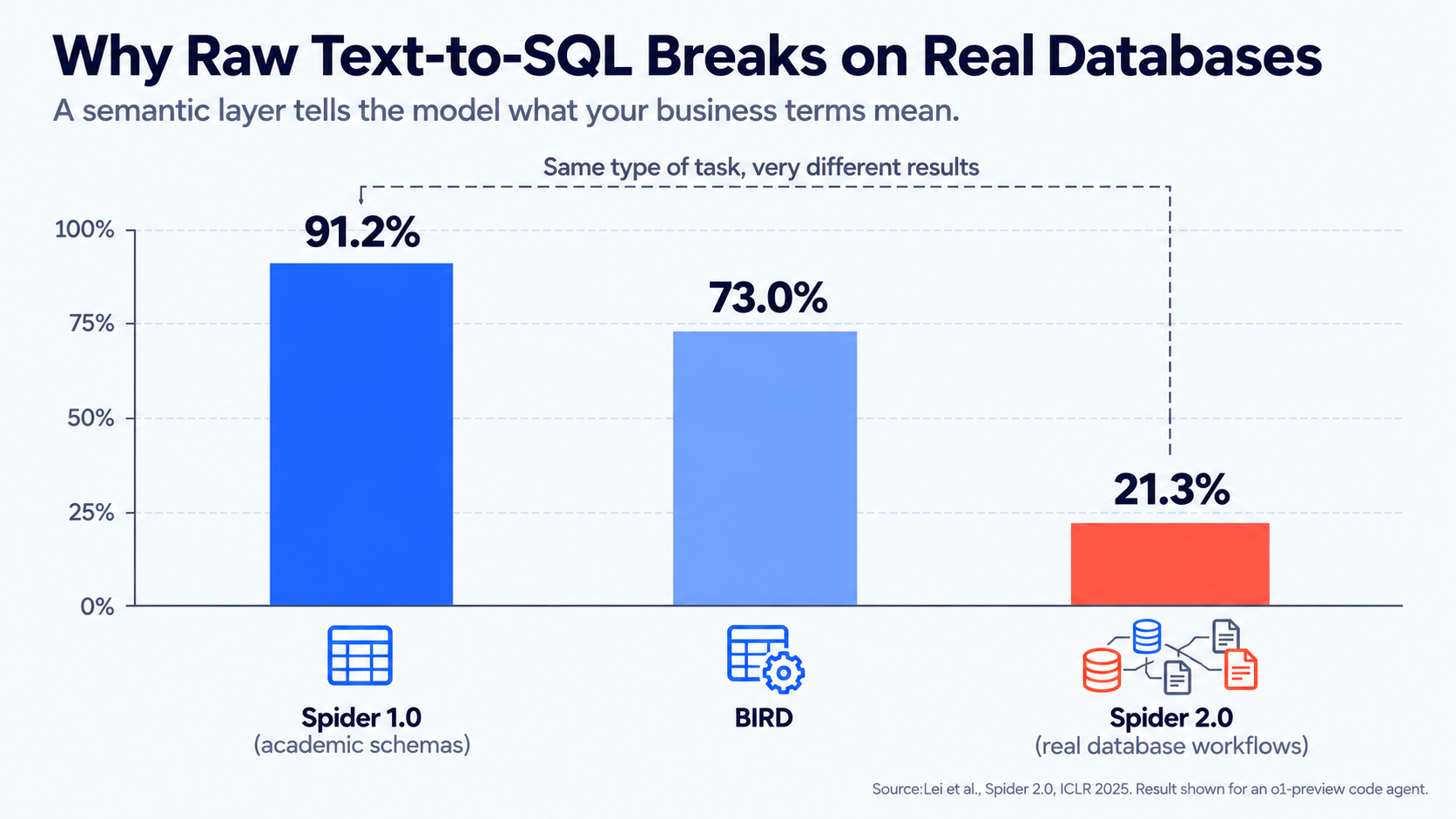
Raw text-to-SQL fails differently. It queries the right database and guesses at the meaning of "active customer" or "margin." The Spider 2.0 benchmark (Lei et al., ICLR 2025) measured the gap: on real database workflows, an agent built on o1-preview solved 21.3% of tasks, against 91.2% on Spider 1.0 and 73.0% on BIRD. Clean academic schemas flatter the model. Read the paper.
A bigger model does not close that gap. A semantic layer that tells the model what your terms mean does.
Step by step
See how the agent works, step by step
Follow one business question from plain English to a validated, traceable answer.
"Models write fluent SQL. What they cannot know is how your business defines its own terms, and two teams can define revenue differently, and both be right. Until that definition is written down in the semantic layer, the agent is guessing, and a confident guess is the most expensive kind."
How an AI data agent works
The six steps below follow one question through the system: "Which product lines lost margin last quarter, and why?"
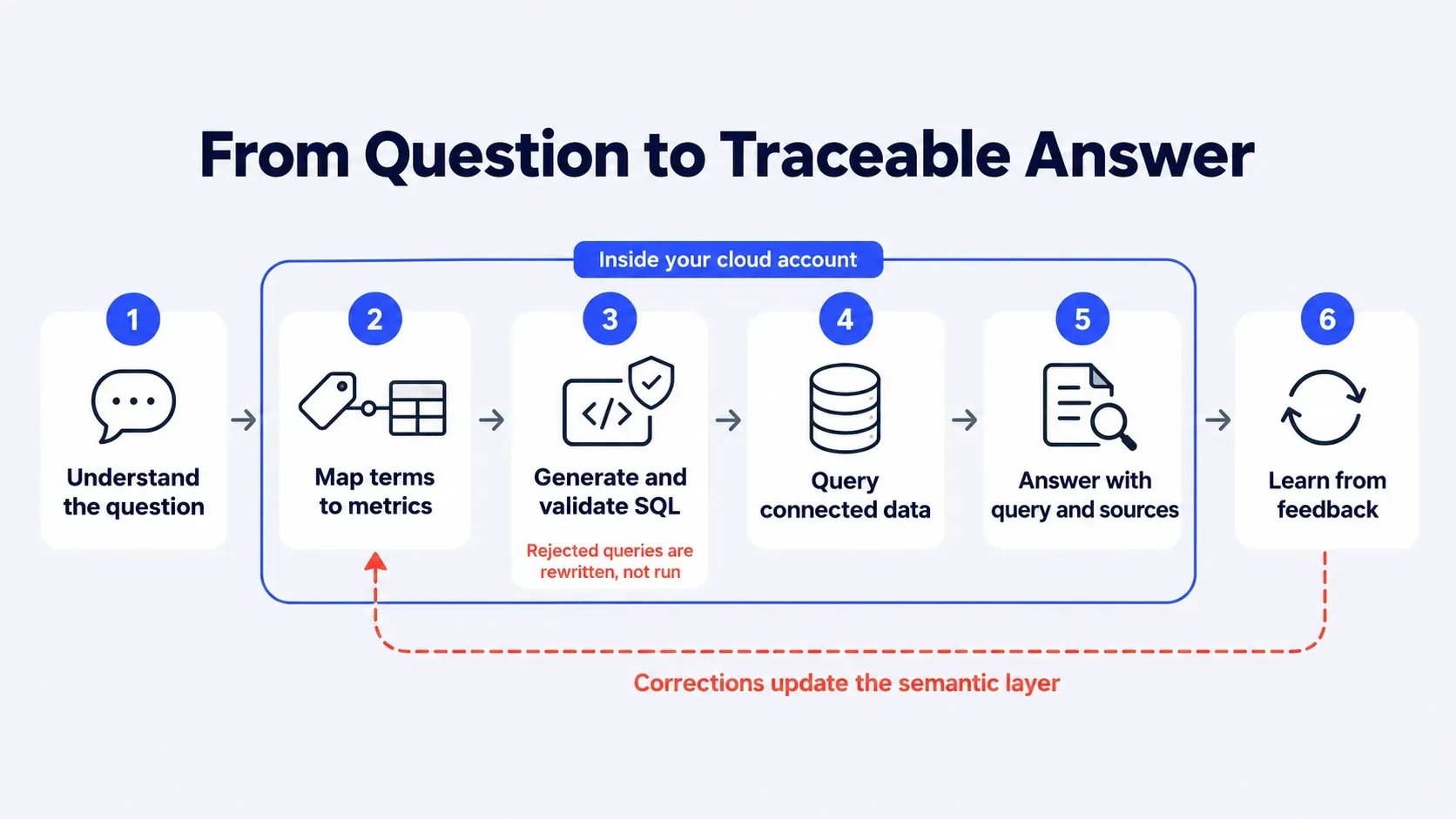
Step 1: Understands the business question
The agent identifies the entities (product lines), the measure (margin), and the time frame (last quarter). If the question is ambiguous, for example, "last quarter" in a company with a fiscal calendar, it asks a clarifying question before it queries anything.
Step 2: Maps terms to metrics
"Margin" is looked up in the semantic layer. There it resolves to one approved definition, such as net sales minus cost of goods sold, with its synonyms and the tables it draws from. This step is where two teams stop getting two answers.
Step 3: Generates and validates SQL
The model writes the query. A validation layer then checks it before anything runs: the syntax, whether every table and column exists, whether the joins follow the paths defined in the model, and whether the query is read-only. A query that fails any check is rejected and rewritten, not executed.
Step 4: Query your connected data sources
The validated query runs against the structured data layer in your cloud, which is fed by connectors to your ERP, CRM, financial systems, and SQL databases. Each source syncs on a schedule agreed in week 1, so freshness is a setting you choose, not a surprise.
Step 5: Returns answer with reasoning
The user sees the answer, the metric definition used, the sources queried, and the SQL itself. An analyst can verify the logic in a minute, and a user can challenge a number with evidence in hand.
Step 6: Learns from user feedback
When a user flags a wrong answer, the correction goes to the semantic layer or the approved question library. Over weeks, the agent gets sharper on your vocabulary. The underlying model is not retrained on your data.
Core components of AI data agent software
Every working data agent has the same six parts. Missing one explains most failed pilots.
LLM reasoning engine
A cloud-hosted model that reads the question and drafts the query. Talk to Your Data runs on the model service in your own cloud, such as Azure OpenAI, Vertex AI, or Amazon Bedrock.
Semantic layer and metric definitions
Built from the schema, a profile of the data, and a business glossary of entities, measures, and synonyms. This is where "revenue" gets one meaning.
Data source connectors
SQL databases, warehouses, and business systems including SAP, Oracle NetSuite, Microsoft Dynamics, Salesforce, and HubSpot.
Role-based access controls
The agent applies each user's permissions to every query, so a regional manager sees the region and nothing else.
Query logs and audit trail
Every question, query, and answer is recorded and attributable to a user.
Evaluation test set
A fixed set of questions with reference answers, re-run after every change to the semantic layer. Without it, nobody can say whether an edit made the agent better or worse.
Accuracy test
Test any agent before you sign
Use the 20-question accuracy test to score an agent on your own schema, including questions it should refuse.
AI data agent vs other data tools
Four kinds of tools are compared with an AI data agent. Each is the right choice in some setups. The table shows where each stops.
| Approach | Connected to business systems | Custom business logic | Shows its query | Runs in your cloud | Cross-system answers | Metric definitions you own |
|---|---|---|---|---|---|---|
| BI dashboards | Only what was modeled in advance | Yes, built by analysts | No | Depends on vendor | Only if pre-joined | In the BI model |
| BI copilots (Power BI Copilot, Snowflake Cortex Analyst, Databricks Genie) | Their own platform's data | Within the platform's semantic model | Varies by product | Inside the vendor platform | Limited to that platform | In the platform's model |
| Document chat (ChatGPT, Microsoft Copilot) | Files and documents, not connected databases | No | No | Vendor-hosted | Documents only | No |
| Generic connectors (Chat Data, TalktoData AI) | Usually one source at a time | Limited | Varies | Usually vendor-hosted | Limited | Limited |
| Talk to Your Data | ERP, CRM, financial systems, SQL databases | Yes, built on your schema | Yes, every answer | Yes, Azure, Google Cloud, or AWS | Yes | Yes |
The table reflects typical configurations as of October 2026. Check each vendor's current documentation before deciding.
Expert comparison
BI copilots read dashboards. AI data agents read your business.
If your questions cross your ERP, CRM, and databases, a dashboard add-on will not reach them. A 30-minute call shows which approach fits your data setup.
Which approach fits your stack
Sometimes the right answer is not a custom agent. The matrix below is the advice Folio3 gives prospects on a first call.
| Your situation | Start with | Why |
|---|---|---|
| All analytics data sits in Snowflake with clean, modeled tables | Snowflake Cortex Analyst | Its semantic views already ground the model, and there is nothing to build |
| All analytics data sits in Databricks, with analysts to curate spaces | Databricks Genie | Curated spaces keep scope small and answers consistent |
| Microsoft-first, with dashboards already modeled in Power BI | Power BI Copilot | It answers from the models your team already maintains |
| Questions are about policies, contracts, and documents | Microsoft Copilot or ChatGPT with document access | The answers live in text, not tables |
| Top questions touch an ERP, a CRM, and one or more databases | A custom AI data agent | No single platform sees all the data |
| Data must stay in your own cloud account | A custom AI data agent in your cloud | Residency is a design input, not a setting |
A rule of thumb: list your 20 most common data questions and count the systems each one touches. If nearly all stay inside one platform, use that platform's native tool. If many span three or more systems, the native tools run out of reach.
Still sorting out the category? Our guides to chat with your data, conversational analytics software, and self-service analytics software explain how each approach works and how to evaluate it.
AI data agent use cases by team
The questions below are illustrative, not client results.
Operations
Inventory, fulfillment, and SLA tracking. "Which SKUs will stock out in the next three weeks at current sell-through?" pulls from inventory and sales. "Which open orders are at risk of breaching SLA this week?" joins orders with carrier data.
Finance
Variance analysis, cash position, and AR aging. "Which customers moved from 30-day to 60-day aging since last month?" and "Where did operating expense land against forecast, by cost center?" both come from ledger data, with metric definitions agreed once with the controller.
Sales and RevOps
Pipeline health, win rates, and forecasts. "Which open deals older than 60 days have had no activity in 14 days?" and "How does win rate differ by lead source this quarter?" join CRM records with activity logs.
BI and data teams
Fewer ad hoc tickets. Take the 10 questions that arrive most often as tickets and move them into the agent's approved question library. Analysts keep the modeling work and lose the repeat requests.
Leadership
On-demand KPI answers. "What changed in gross margin against plan, and which three accounts drove it?" returns with the query attached, so the answer survives a follow-up question in the board meeting.
Meet Folio3 Talk to Your Data
Talk to Your Data is a custom-built AI data agent, not a pre-built tool. Folio3 configures it around your schema, your metric definitions, and your access rules in your cloud.
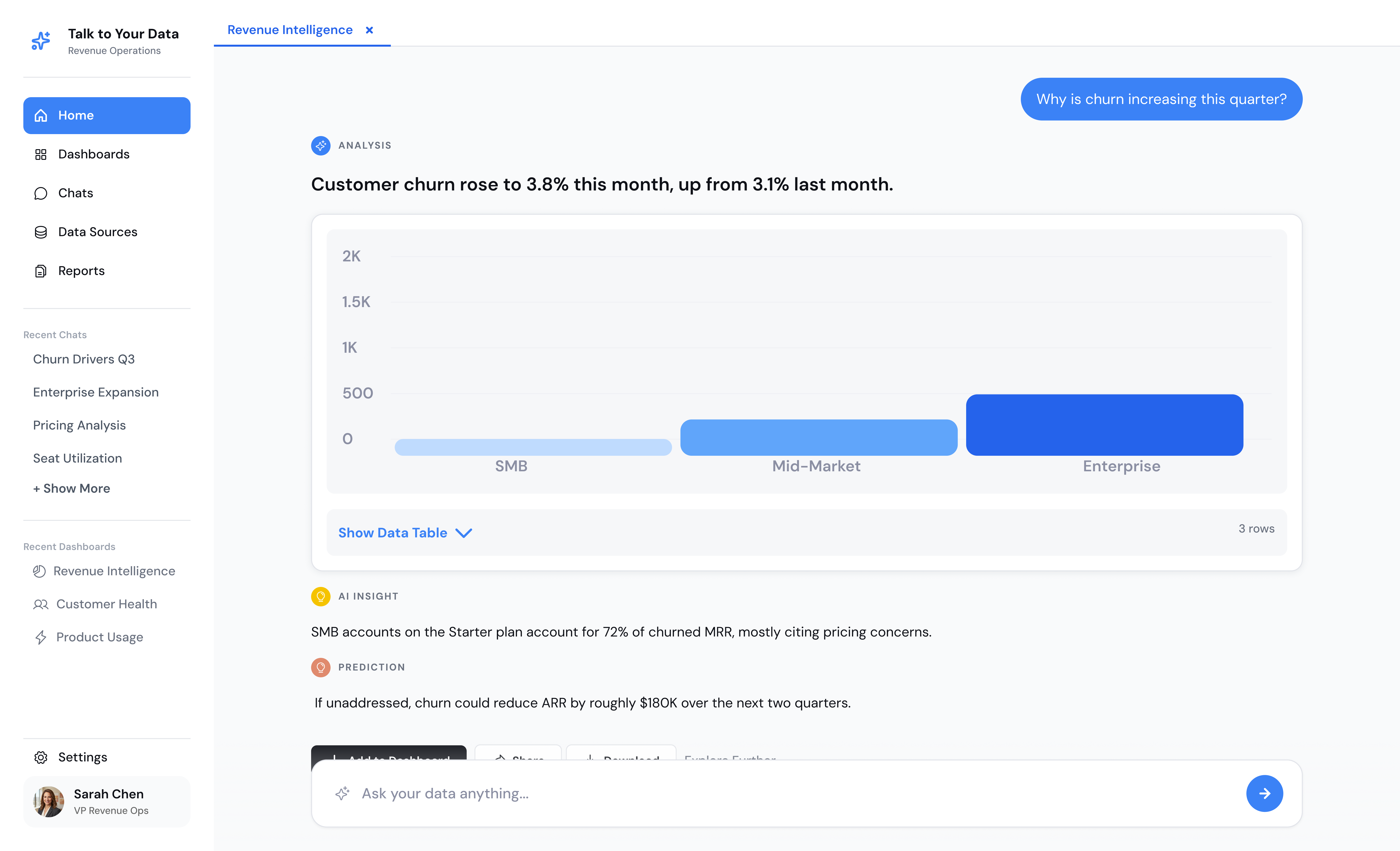
Plain-English questions, instant answers
Users ask in Slack, Teams, or your own application. No ticket and no wait for an analyst.
Connects to your existing systems
SAP, Oracle NetSuite, Microsoft Dynamics, Salesforce, HubSpot, financial systems, and any SQL database feed one agent.
Shows the query behind every answer
The SQL, the metric definition, and the sources appear beside each number, so any answer can be checked.
Respects existing user permissions
Access rules defined in the build apply to every question, so users only see the data they are already cleared to see.
Deploys inside your cloud environment
The agent, its database, and its model calls run in your Azure, Google Cloud, or AWS account.
Scales from 1 to 1,000+ users
The package price stays the same for one user or a thousand, with no per-user fees.
The Chat With Your Business Data package
One package, one price, and a free demo to start.
| Item | Detail |
|---|---|
| Fixed scope | 4-week engagement, $20K |
| Cloud runtime | $100 to $300 per month, billed by your cloud provider |
| User capacity | 1 to 1,000+ users |
| Exit flexibility | Uninstall in under one hour, no further charges |
| Start point | Free 30-minute demo |
The $20K covers three things: implementation (cloud AI and database setup and data ingestion, $10K to $12K of the budget), user enablement (analyst coaching, pilot training, query tuning), and expansion hours. Whatever budget remains goes to additional agents or integrations.
What a year-one AI data agent costs
Year one is $20,000 plus 12 months of runtime at $100 to $300, which lands between $21,200 and $23,600. The $1,200 to $3,600 runtime portion goes to your cloud provider, not to Folio3.
To estimate payback, multiply monthly data tickets by hours per ticket, then by your loaded hourly rate. Multiply by the share of tickets the agent will absorb. Divide the year-one range by that monthly saving.
Hypothetical inputs, to be replaced with your own: 120 tickets a month, 1.5 hours each, at $60 an hour is $10,800 a month. If the agent absorbs 40% of those tickets, the savings are $4,320 a month, and the $21,200 to $23,600 pays back in 4.9 to 5.5 months.
Schema-based demo
Test an AI data agent against your own schema
Vendor demos on sample data prove little. Share your table structure and see how accurately Talk to Your Data handles the questions your team actually asks.
From demo to live agent in 4 weeks
Week 1: Kickoff, discovery, and data mapping
Live demo, cloud access setup, and selection of the highest-value first dataset. The team agrees on which questions the agent must answer first and on the sync schedule for each source.
Week 2: Build, deploy, semantic layer and ingestion
Folio3 deploys the AI services, provisions the database, ingests the initial data, and builds the semantic layer against your business terms and access rules.
Week 3: Pilot with 2 to 3 users and accuracy validation
Two or three pilot users start asking real questions. Folio3 analysts coach them on effective questions and score the agent with the 20-question test.
Week 4: Expand and handoff
Additional agents and integrations are added with remaining hours, training is completed, and the production agent goes live.
"Four weeks holds when three things are in place in week one: read access to the source systems, one person who owns the metric definitions, and two or three pilot users who will ask real questions. When one of those is missing, that is where the schedule slips."
Security and governance built in
Data stays in your environment
The agent, its database, and its model calls run inside your own cloud account, and model calls go to the model service in that account rather than a public chatbot endpoint.
Row-level and role-based access
Access rules are defined in week 2 and tested in week 3, including questions a user should not be able to answer.
Full query audit logs
Every question, generated query, and answer is logged against the user who asked.
Human review for sensitive requests
Questions in categories you name, such as compensation, can be routed to a named reviewer before an answer returns.
Folio3 holds ISO 27001 certification.
AI Guardian
Govern the rest of your AI use
Talk to Your Data controls how staff query company data. It does not control what they paste into public chatbots. AI Guardian covers that: it masks sensitive data before it reaches any AI model, logs every request to a real person, and sets spend caps by team. It deploys in your own cloud in 4 to 5 business days.
How to evaluate AI data agent solutions
| Criterion | What to ask | Red flag |
|---|---|---|
| Accuracy on your own schema | Can I run my questions on my tables during the demo? | Demo only on sample data |
| Transparency of generated queries | Is the SQL visible with every answer? | Answers with no query |
| Permission and access handling | What happens when a user asks about data they cannot access? | No test for it |
| Deployment location and data residency | Which cloud account holds the data and the model calls? | Vendor-hosted only |
| Pricing model and runtime costs | What is the fixed price, and who pays for runtime? | Per-user fees that scale with adoption |
| Time to first answer | When will real users get a real answer? | No date |
The 20-question accuracy test
Run this before you sign with anyone. Build 20 questions with your analysts and write the reference answer for each from your own reports.
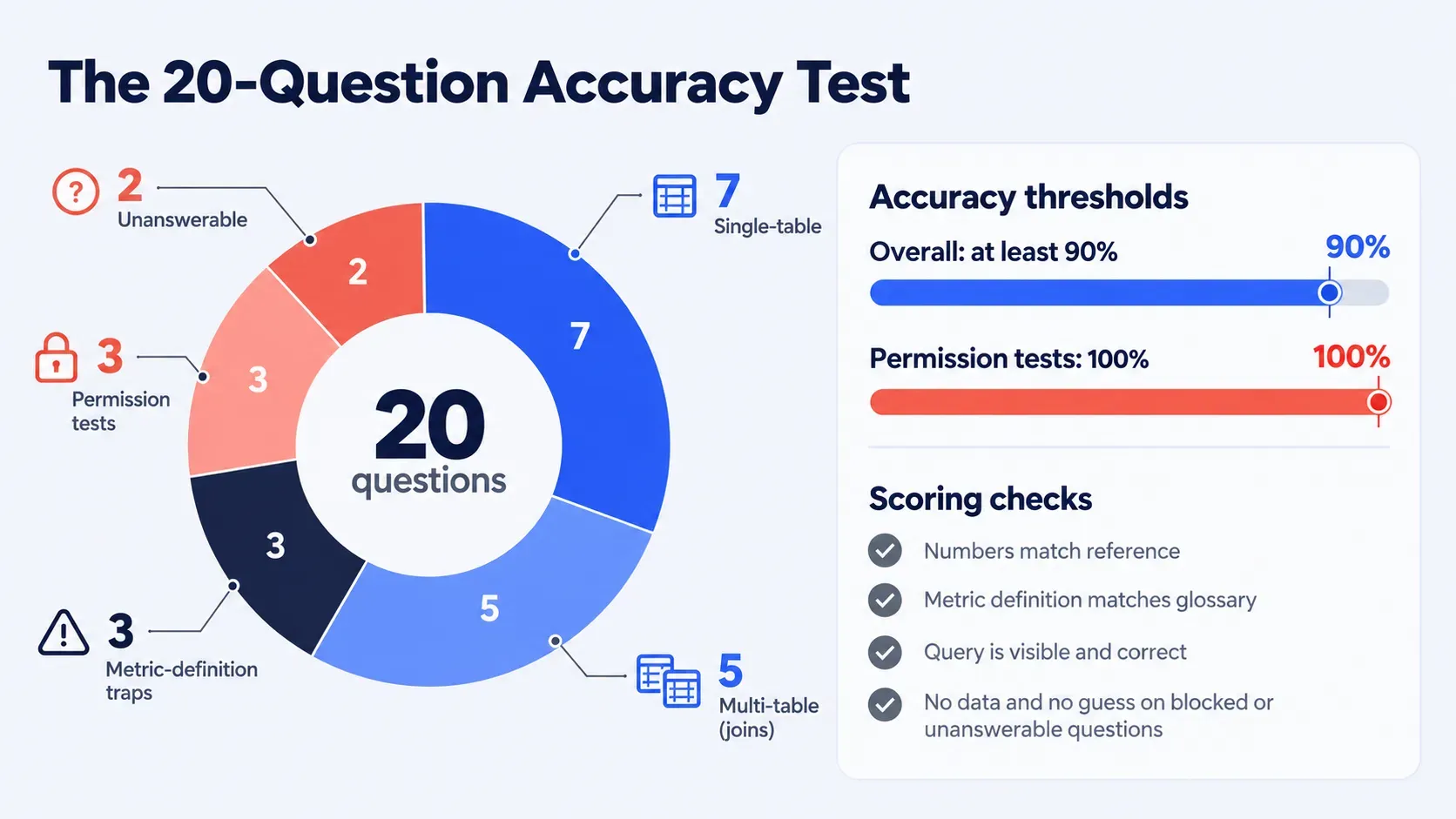
7
single-table questions, such as "total sales last month."
5
multi-table questions that need joins, such as "revenue by product line and region."
3
metric-definition traps, such as a term two teams define differently.
3
permission tests, where a user asks for data their role should not reach.
2
unanswerable questions, where the right response is a refusal or a clarifying question.
Score each answer on four checks. Numbers match the reference. The metric definition matches the glossary. The query is visible and reads correctly. Permission and unanswerable questions return no data and no guess.
Folio3's suggested starting bar is 100% on permission tests and at least 90% overall, adjusted to your risk. Re-run the set after every semantic layer change.
Common AI data agent challenges
| Challenge | Why it happens | Fix |
|---|---|---|
| Wrong or invented SQL | The model guesses at tables and joins | Query validation layer |
| Ambiguous business metrics | Two teams define a term differently | Shared semantic definitions |
| Poor source data quality | Nulls, duplicates, inconsistent codes | Data readiness check |
| Low user adoption | Users do not know what to ask | Team-specific question libraries |
| Permission leakage | Access rules not applied at query time | Row-level tests before go-live |
| Confident answers to unanswerable questions | The model fills gaps | Refusal rules and clarifying questions |
When an AI data agent is not the right fit
A custom agent is not always the right first purchase. These four situations point to a different tool, and Folio3 says so on a first call.
Your data sits in one clean platform
If every question stays inside Snowflake, Databricks, or Power BI with modeled tables, that platform's native tool costs less and needs no build.
Your source data is not ready
Missing keys, duplicate records, and inconsistent codes produce wrong answers, so start with an AI readiness assessment.
You need the agent to change records
Talk to Your Data reads and explains. Write-back to source systems is outside the 4-week package.
Your questions are about documents
Contracts and policies live in text, not tables, so AI search across company documents fits better.
"Run your own twenty questions before you sign with anyone, and include a few the agent should refuse. An agent that answers everything is the one to worry about, because a wrong number delivered with confidence does more damage than no number at all."
Why teams choose Folio3 for AI data agents
Folio3 builds the agent around your schema instead of handing over a template. The team is made up of engineers, not resellers, and the price and timeline are fixed before work starts. More than 150 organizations already use Folio3 software and AI solutions, backed by 20+ years in business and 950+ projects delivered.
One framework, three offerings
Talk to Your Data is one of three Folio3 offerings that work in sequence.
Phase Zero
Finds which AI use cases deserve investment first.
Talk to Your Data
Answers questions from your business data.
AI Guardian
Governs how staff use AI across the company.
Industries served
| Industry | A question the agent answers |
|---|---|
| Financial services | "Which accounts breached exposure limits this month?" |
| Retail and distribution | "Which stores are overstocked against their sales rate?" |
| Real estate and construction | "Which projects are running over budget on materials?" |
| Healthcare | "Which clinics have the longest appointment wait times?" |
| Education and research | "Which programs saw enrollment drop against last year?" |
Free 30-minute demo
Get answers from your data, not another dashboard
Bring your table structure to a free 30-minute demo and watch Talk to Your Data answer your team's real questions, with the query shown. Your analysts can check every answer on the spot. Then decide if the 4-week, $20,000 package fits.
FAQs
What is an AI data agent?
An AI data agent is software that turns a plain-language business question into a validated database query, runs it against connected data sources, and returns the answer with the query shown. It applies your metric definitions and access rules, so answers stay consistent and traceable.
How does an AI data agent differ from a chatbot?
A chatbot generates text from a model's training and the documents it can see, while a data agent writes and runs queries against your systems. Its numbers come from your data, and each one traces to a query.
Is an AI data agent different from BI copilots?
BI copilots answer inside one platform and one set of models, such as Power BI or a single warehouse. An AI data agent spans your ERP, CRM, and databases and applies metric definitions you own.
How accurate are AI data agent answers?
Accuracy depends on how well the semantic layer defines your metrics and joins, so Folio3 measures it on your own schema with a 20-question test before go-live. Published benchmarks show why: a leading agent solved 21.3% of Spider 2.0 tasks against 91.2% on Spider 1.0.
Does my data leave my environment?
No. The agent, its database, and its model calls run inside your own Azure, Google Cloud, or AWS account.
How much does AI data agent software cost?
The Chat With Your Business Data package is a fixed $20,000 for a 4-week engagement, with no per-user fees. Cloud runtime of $100 to $300 per month is billed by your cloud provider, which puts year one at $21,200 to $23,600.
How long does it take to deploy an AI data agent solution?
Talk to Your Data goes from kickoff to a live agent in 4 weeks. Week 1 covers discovery, week 2 the build, week 3 the pilot and accuracy validation, and week 4 the handoff.
Can non-technical teams use an AI data agent?
Yes. Users ask in plain English in Slack, Teams, or your own application, and Folio3 analysts coach 2 to 3 pilot users on effective questions during the 20-question accuracy test sessions in week 3.
What happens if we want to stop using it?
The agent can be uninstalled in under one hour with no further charges, and there are no long-term contracts. Your data stays in your cloud account throughout.
Do I need a data warehouse or semantic layer first?
No. The semantic layer is built in weeks 1 and 2 from your schema and business glossary, and the agent works with any SQL or structured database. Poor source data quality is a separate risk, so a data readiness check comes first.
How do you measure accuracy before go-live?
Folio3 builds a 20-question test set with your analysts, and scores answers against reference results for numbers, metric definitions, permissions, and refusals. The set is re-run after every change to the semantic layer.
Written by the Folio3 AI Editorial Team. Reviewed by Abdul Sami, Head of AI Development at Folio3 AI, in October 2026. ISO 27001 certified. 20+ years and 950+ projects delivered. Same-day response.
Contact
Let's get in touch
Fill the form below or Contact us at +1 408 365-4638 / email us via contact@folio3.ai
20+ Years
Years of Engineering Excellence
950+ Projects
Projects Delivered Worldwide
99%
Client Satisfaction
Enterprise AI
Build | Govern | Scale
Same Day
Response Guaranteed

Contact Info
+1 408 365-4638
contact@folio3.ai

Visit our office
6701 Koll Center Parkway, #250 Pleasanton, CA 94566