
Hallucinated column names
The model invents a field such as customer_ltv_net when only ltv_gross exists, so the query fails or quietly returns a different column's values.
AI agents can generate valid SQL and still return the wrong business answer. The problem is rarely syntax. Terms such as revenue, active customer, churn, pipeline, and margin carry business rules that do not exist in raw column names.
An AI semantic layer gives those terms governed definitions, relationships, and access rules, so agents query business meaning instead of guessing it from the schema.
AI semantic layer software is a governed translation layer between your databases and your AI agents. It defines each business term, metric, join, and access rule once, so an agent queries "net revenue" the way your finance team calculates it instead of guessing from column names.
The need is measurable. Gartner predicts that through 2026, organizations will abandon 60% of AI projects unsupported by AI-ready data, and its July 2024 survey of 1,203 data management leaders found that 63% lack, or are unsure they have, the right data management practices for AI.
This guide explains how a semantic layer works, which types exist, how to choose one, and how Folio3 builds one in four weeks.
This guide is written for the teams that own structured data and the numbers built on it. Each role meets the same problem from a different side.
| Role | Primary pain |
|---|---|
| Head of Data / Analytics | Analysts keep reconciling definitions and answering repeat questions |
| BI leaders | Different dashboards and teams produce different versions of the same KPI |
| CIO / Data platform leaders | AI assistants need a governed way to access structured company data |
| AI / Data engineering teams | Text-to-SQL works technically but fails on business semantics and permissions |
| Finance / RevOps leaders | They need numbers they can trace and defend |
A language model reads column names, not your business rules. When those rules live in analysts' heads and dashboard filters, an AI agent fills the gaps with plausible guesses. Six failure patterns show up again and again.
The model invents a field such as customer_ltv_net when only ltv_gross exists, so the query fails or quietly returns a different column's values.
Finance reports revenue after refunds in Power BI while Sales reports it before refunds in a CRM report, so one label carries two numbers.
A many-to-many join between orders and shipments counts revenue twice for split deliveries, and nothing in the result signals the duplication.
A chat tool with warehouse-level credentials can return salary bands or customer contacts to anyone, because the rule lives in a dashboard, not the query.
Asking for "sales last quarter" and then "Q3 revenue" can route to different tables, filters, and date logic, so two executives hold two numbers.
Every doubted number lands in the BI queue, so the analyst team spends the week reconciling figures instead of building new analysis.
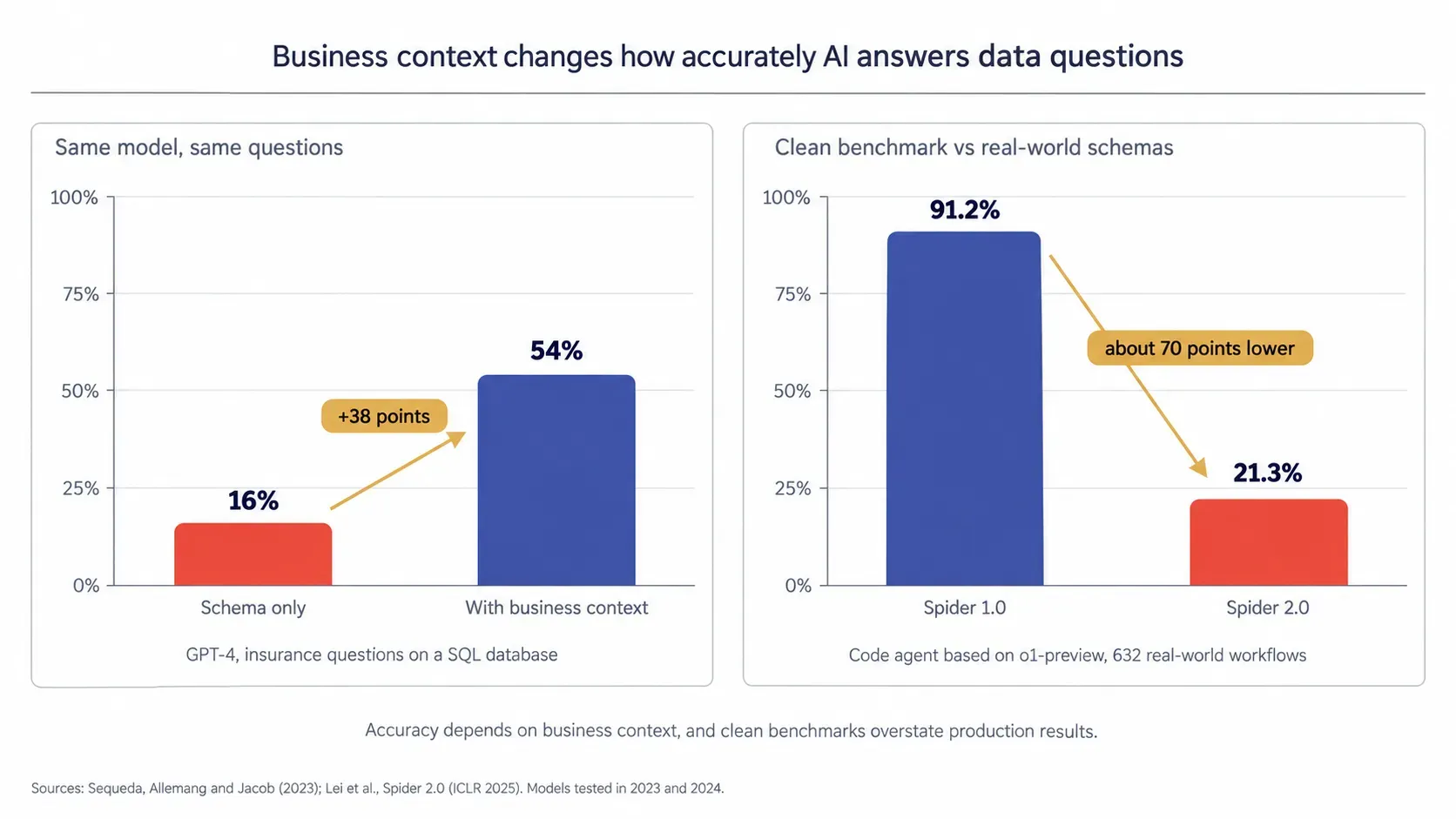
The research points in the same direction, with caveats. In a published benchmark of insurance questions on a SQL database, GPT-4 answered 16% correctly with zero-shot prompts directly on the schema, and 54% when the same questions ran over a knowledge graph representation that added business context (Sequeda, Allemang and Jacob, 2023).
The Spider 2.0 benchmark, built from 632 real-world database workflows on schemas that often exceed 1,000 columns, reported that a code agent based on o1-preview solved 21.3% of tasks (Lei et al., ICLR 2025). Spider 2.0 was deliberately designed to be much harder than the earlier Spider 1.0, where the same agent scored 91.2%, so the gap reflects benchmark difficulty rather than a like-for-like drop in accuracy. Both papers tested 2023 and 2024 models, and newer models will score higher.
These studies illustrate two related problems. Adding structured business context can materially improve performance, while more realistic schemas remain substantially harder than simplified text-to-SQL benchmarks. Neither result is a direct benchmark of commercial semantic-layer software, so buyers should test accuracy on their own schema and business definitions.
Data and BI leads who hit this wall usually have a copilot pilot that worked in the demo and stalled when finance asked which revenue number it used.
"A model will answer any question you put to it. The semantic layer decides whether that answer is built from your definition of revenue or from the model's best guess at one."
A semantic layer is the part of a data stack that records what your data means. It sits between warehouses and everything that queries them, so dashboards, apps, and AI agents all read the same governed definitions.
-feca40b8-b41d-47fb-a5f8-fd58e1107190.webp)
A semantic layer is a governed model that maps raw tables and columns to business terms, metric formulas, relationships, and access rules, so every tool and AI agent that queries the data uses the same definitions.
Governed means each definition has a named owner, a version history, and access rules that are enforced on every query, not left to each dashboard.
Take a column named fact_orders.amt_net. In the semantic layer, it becomes "Net Revenue": the sum of amt_net minus refunds, excluding test orders, reported on the fiscal calendar. Anyone or anything asking for Net Revenue gets that calculation, whether the request comes from a dashboard, a spreadsheet connector, or an AI agent.
The layer sits between the warehouse or database and the consumers. Requests arrive in business terms. The layer translates them into SQL, applies filters and permissions, and returns the result with its definition attached.
The idea is not new. OLAP cubes appeared in the 1990s, code-based models such as LookML in 2012, and headless layers in the 2020s. The current generation adds AI-native design: synonyms, guardrails, and interfaces that agents can read.
A metrics layer is a subset. It standardizes metric formulas such as MRR or churn rate. A semantic layer includes those formulas and adds dimensions, joins, synonyms, hierarchies, and access rules, which an AI agent needs to interpret a question beyond calculating a number.
A data catalog inventories data assets with owners, tags, and lineage, mainly for people searching for data. A semantic layer executes: it turns a business question into a governed query. Many teams run both, with the catalog documenting what the layer exposes.
Knowledge graphs and ontologies explicitly model entities, relationships, and concepts. Semantic layers expose governed business concepts and metrics to consuming tools, often over warehouse data. The two can complement each other, and the 16% to 54% result above points to what they share: business context placed in front of the model can raise accuracy.
Nine components make a semantic layer usable by an AI agent. Five define meaning, two control access and speed, and two record who owns a definition and what changed. Missing any one of them shows up later as a wrong or unexplainable answer.
The who, what, where, and when, such as customer segment, product line, region, and fiscal quarter, each defined once and applied to every measure.
Calculated values like net revenue or churn rate, written once with their formula, so they return the same result sliced by region, product, or month.
Declared paths between tables, such as orders to customers to regions, with link type marked, so agents never invent a join or double count totals.
Maps everyday words to defined terms, so "sales," "bookings," and "rev" resolve correctly and "active customer" means one thing in every question.
Rules like exclude test accounts or count active contracts only live inside the metric, so nobody has to remember to add them to each query.
Permissions decide which rows and columns each role sees, applied before results return, such as regional managers seeing only their own territory.
Common metric and dimension combinations are precomputed or cached, so repeated questions return quickly and do not rescan large fact tables every time.
A record linking each metric to its source tables and logging each question and query so that a reviewer can trace any answer to the data.
Each definition carries a named owner, a draft or certified status, and a change history, so people know which numbers belong in a board pack.
A definition card is the working unit of a semantic layer. Ten fields describe one metric completely. The example below uses Net Revenue with illustrative values. If a metric cannot fill every field, it is not ready for an AI agent.
| Field | Example: Net Revenue |
|---|---|
| Name | Net Revenue |
| Plain-English definition | Revenue from completed orders after refunds and discounts |
| Formula | Sum of fact_orders.amt_net minus refunds |
| Filters | Status is completed; test orders excluded |
| Time grain | Day, rolled up to fiscal week, month, and quarter |
| Allowed dimensions | Region, product line, customer segment, channel |
| Synonyms | Sales, net sales, revenue, rev |
| Owner | Head of Finance Operations |
| Access rule | Regional managers see their region; finance sees all regions |
| Status and change log | Certified; every edit logged with date, author, and reason |
An agent that can write SQL can also write wrong SQL with full confidence. A semantic layer for AI agents changes the task from inventing a query to selecting from governed definitions, which narrows room for error and makes each answer checkable.
Before it writes anything, the agent reads the model: which metrics exist, what each one means, which dimensions apply, and which synonyms point to them. For modeled metrics, the agent selects defined fields, so invented column names and misapplied filters cannot occur.
The agent requests a metric by name, with dimensions and filters, and the layer generates the SQL. Joins, formulas, and date logic come from the definition and not from the model's memory of the schema. An analyst reviews one definition instead of thousands of generated queries.
The same question returns different results for different roles. A regional manager asking for pipeline sees their territory, and finance sees every region. Because the rule sits in the model, a new agent or channel inherits it without separate configuration. Teams running many agents at once can pair the model with AI agent governance for oversight beyond data access.
"Access rules belong next to the metric. Put them in the chat layer and every new agent becomes another place to get them wrong."
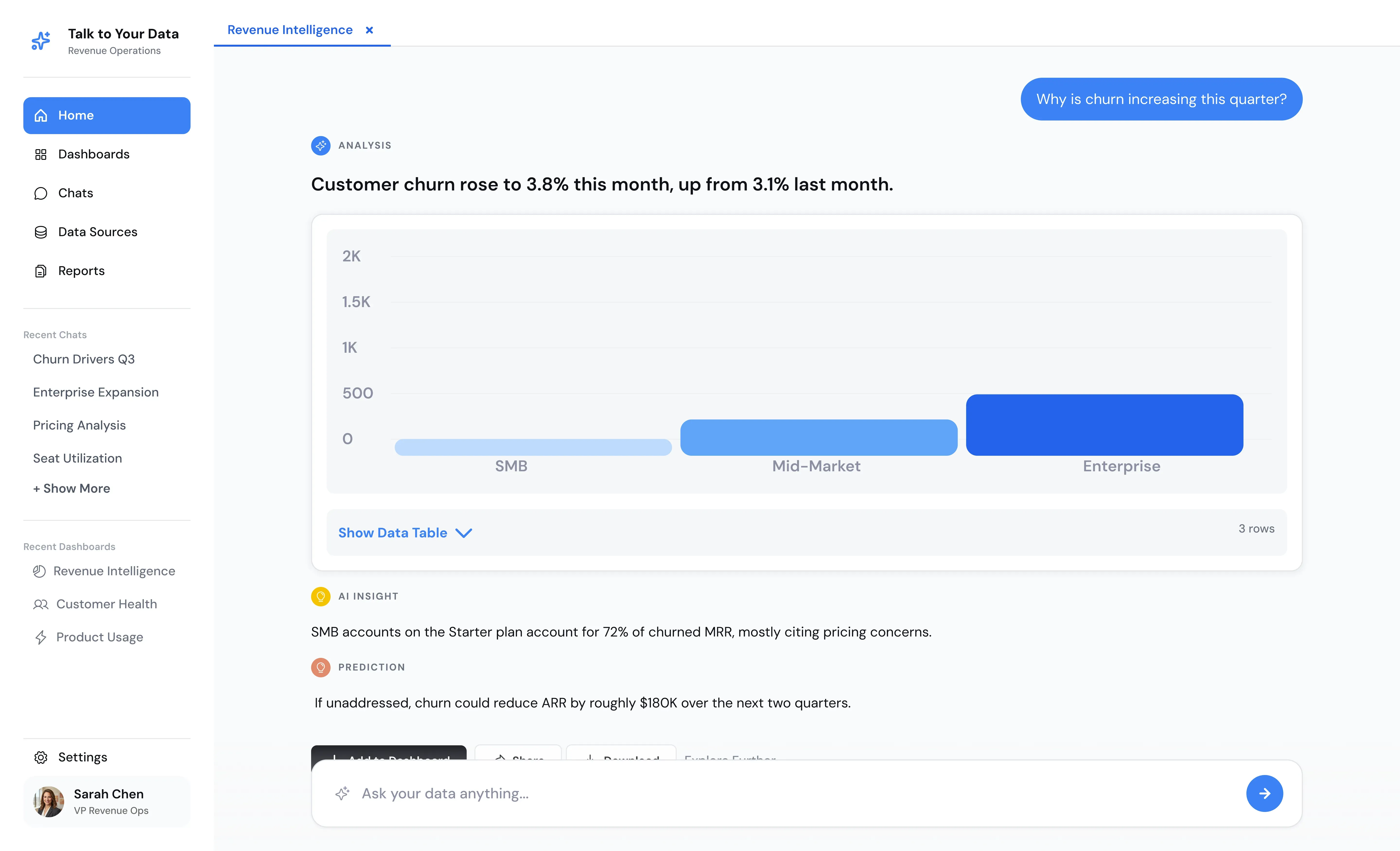
Each answer should show the metric used, its definition, and the query that ran. A finance reviewer can then verify a figure in minutes, and a doubtful chatbot answer becomes an auditable one.
That holds whatever the front end is called. Chat with your data tools, conversational analytics software, and self-service analytics software all give answers that are only as reliable as the definitions underneath them.
MCP, the Model Context Protocol, is an open standard for connecting AI applications to external data sources and tools. A semantic layer exposed through MCP works in two steps. First, the agent discovers: it lists the available metrics and reads their definitions. Then it queries: it requests a governed result. Any MCP-capable agent can use the same model without custom integration code.
Definitions change when revenue recognition rules change or a product line launches. Treat each change like a code change. A named owner approves it, the effect on dependent metrics is visible before release, and the old version stays in the history. Add a drift check that flags any metric whose value moves without an approved change.
Log every question the layer could not answer and review the log monthly. Repeated requests such as "high-value customers" point to missing definitions. Promote the best candidates into the model with an owner, and coverage grows from real demand instead of guesswork.
The same question, run three ways, shows where each approach breaks. The scenario below is illustrative and uses no client data.
"What was net revenue in EMEA last quarter?"
| Approach | What happens | Likely failure | Can a reviewer audit it? |
|---|---|---|---|
| Raw text-to-SQL | Reads column names, picks the closest match to "revenue", guesses the quarter and the list of EMEA region codes | Gross instead of net, calendar instead of fiscal quarter, missing region codes | Only by reading the generated SQL |
| RAG on documents | Retrieves the passage in the last board deck that mentions EMEA revenue | A quoted figure weeks old, possibly on another definition, with no calculation on live rows | To the document, not to the data |
| Semantic layer | Maps "net revenue" to the certified definition, applies the fiscal calendar, expands EMEA to its region list, applies the asker's role and queries the source at request time | Fails only if the definition itself is wrong, which is visible and fixable in one place | Yes: metric, definition and query shown |
Three methods give three numbers. Only one of them has an owner who can be asked why.
RAG and semantic layers solve different problems. RAG retrieves answers from documents, and a semantic layer computes answers from structured data. Text-to-SQL sits between them with no business rules. The table compares the four approaches buyers weigh most often.
| Criterion | Raw text-to-SQL | RAG on documents | BI-embedded semantics (Power BI, Looker) | Talk to Your Data (semantic layer + AI agent) |
|---|---|---|---|---|
| Accuracy on business metrics | Model infers meaning from column names; accuracy drops as schemas grow | Accurate when the answer sits in a document; no calculation on live rows | Accurate inside that tool's governed models | Answers use metric definitions built for your data |
| Consistency across repeated questions | Can vary with phrasing and model version | Varies with which passages are retrieved | Consistent inside the tool; other tools may differ | One definition applies to every phrasing |
| Governance and access control | Database grants only; no business-level rules | Document-level permissions at best | Strong inside the tool, separate rules elsewhere | Role, row and column rules are enforced at query time for every metric |
| Works with live data | Yes | Usually indexed copies refreshed on a schedule | Live or scheduled extracts, by configuration | Direct query connections to your warehouse or database |
| Setup effort and ownership | Low setup, high review burden on analysts | Indexing and chunking owned by engineering | Modelers inside the BI team | Custom model built in four weeks; your team owns definitions after handover |
| Best fit use case | Exploration by analysts who read the SQL | Policies, contracts, manuals, knowledge bases | Teams standardized on one BI tool | Plain-English questions on structured data across roles |
Use RAG for policies, contracts, manuals, and knowledge bases. Use a semantic layer for numbers that live in tables. Many teams run both: RAG answers "what does our refund policy say," and the semantic layer answers "how much did we refund last month."
Score your readiness in three minutes with ten yes or no questions.
AI semantic layer software falls into five architectures, classified by where the semantic definitions live. That choice decides who can reuse them, how easily they move between tools, and how well AI agents can read them.
LookML and Power BI semantic models define metrics inside one BI tool. Governance is strong there but does not automatically extend to notebooks, apps, and outside agents.
AtScale and Cube hold definitions outside any BI tool and serve them through SQL and APIs, so several tools and agents read one model.
Snowflake semantic views and Databricks metric views keep definitions beside the data with warehouse permissions applied. Reuse is strongest inside that platform.
dbt MetricFlow defines metrics as code inside the transformation workflow, under version control. It suits teams that already model their data in dbt.
A model designed around one company's tables and questions, built for a specific application or AI agent. Talk to Your Data is an example of the application-specific/custom approach.
| Type | Reach | Portability consideration | AI readiness | Best for |
|---|---|---|---|---|
| BI-native | One BI tool | Definitions use the tool's modeling language; check export and API options | Depends on the tool's own assistant | Teams on a single BI tool |
| Headless/universal | Any tool that connects over SQL or API | Definitions use the layer's modeling format; most expose SQL and API access | Strong when it exposes agent interfaces | Several BI tools and a central data team |
| Warehouse-native | Everything on that warehouse | Definitions sit on one platform; check how outside tools read them | Strong for the platform's own assistant | Single-warehouse teams with in-house engineers |
| Metrics-as-code / open source | Tools that read the metrics API | Definitions live as code in Git | Varies by integration | Teams already modeling in dbt |
| Application-specific / custom | Agents and apps built on the model | Depends on how definitions are documented and handed over | Built for agents from day one | Teams without semantic tooling who want an agent in weeks |
| Your situation | Likely fit |
|---|---|
| One BI tool, a small data team, definitions mostly agreed | BI-native semantic model |
| Several BI tools, a central data team with modeling skills | Headless/universal layer |
| One cloud warehouse, strong in-house engineering | Warehouse-native semantic views |
| dbt already in place, metrics defined in code | Metrics-as-code / open-source layer |
| No semantic tooling, an AI agent is the priority, results wanted in weeks | Application-specific / custom semantic model |
One case favors none of these: if three or more BI tools already read from a mature universal layer and your team maintains it, a second layer duplicates effort. Extend what you have, and add an agent on top.
Semantic layers pay off where the same questions repeat, and wrong answers cost money. These six teams are the usual starting points, and each entry lists the kind of question a first pilot should cover.
Daily questions such as "which line missed target yesterday" and "what is on-time delivery by site", answered from source data, not a morning report.
Revenue and margin queries like "net revenue by region this quarter" or "gross margin by product line", using the certified definitions finance signs off on.
Pipeline and quota visibility, such as "what is weighted pipeline for my team" or "which deals slipped this month", with reps seeing only their territory.
Fewer ad hoc requests, because routine questions such as "top ten customers by margin" get answered directly, leaving analysts time for modeling and new analysis.
Board-ready answers faster: "how did churn move this quarter and why" returns a figure, a chart, and the definition behind it on one screen.
Most stalled semantic layer projects tried to model the whole company first. The pattern that works starts with one decision, defines the few metrics behind it, and expands only after real users have asked real questions.
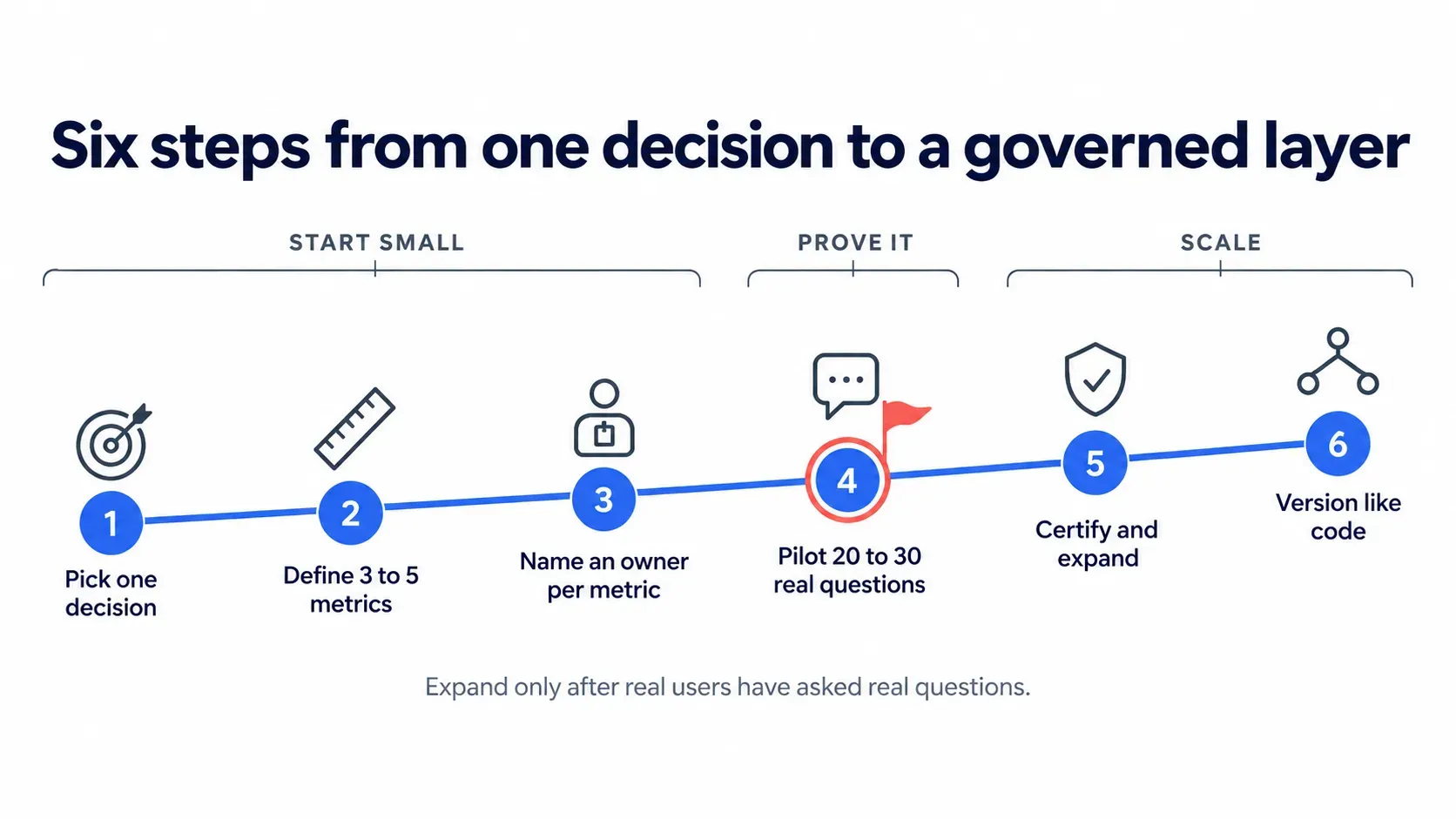
"Projects stall when the first meeting is about tooling. The ones that move start with one decision, the three metrics behind it and a named owner for each."
A four-hundred-field model nobody has tested delays the first usable answer, hides which definitions people actually use, and gives reviewers too much to check.
Without a named owner, a definition changes silently or never changes, and the same dispute returns every quarter. Nobody can say who approves a fix.
Adding permissions after launch means an early version has already exposed data, so set roles before the first user asks a question.
Let teams add local synonyms and filters, then review them before they become company-wide, so the shared core stays small and trusted.
It does not repair wrong source data: a duplicated customer table stays duplicated. It does not settle definition disputes, only records the outcome. It covers modeled questions, so one-off exploration still needs an analyst.
Finance and sales may disagree on what counts as revenue. Expect the first workshop to surface these gaps and schedule time to resolve them.
Cached results can lag the warehouse. Set refresh rules per metric and show the last-updated time on each answer so that readers can judge freshness.
The work needs someone who reads SQL and someone who knows how finance, sales, or operations define a number. One person rarely covers both.
People return to spreadsheets when early answers disappoint. Launch with questions the team already asks and publish the first accuracy results.
Track three numbers. Adoption is the count of weekly active askers. Accuracy is the share of test questions answered correctly against a reviewer's source figure. Time to insight is minutes from question to trusted answer, compared with the analyst-queue baseline.
Ten yes or no questions show whether a semantic layer pilot is ready to start. Score one point for each yes, then read the band below to see where to begin.
| Score | Where you stand | What to do next |
|---|---|---|
| 0 to 3 | Define first | Run a metric workshop before choosing tooling. Pick one decision and write definition cards for three metrics. |
| 4 to 7 | Ready for a scoped pilot | Start with one decision and twenty to thirty real user questions; set roles before the first question. |
| 8 to 10 | Ready to expand | Run the pilot across two teams and add certification and change review to the process. |
A low score on questions 5, 6, or 8 points to a wider readiness gap. The AI readiness assessment and the AI readiness checklist cover strategy, people, and governance beyond the data layer.
Scored 4 or more? The Folio3 team shows how a semantic layer and an AI data agent would work on a dataset like yours, and which of your questions it can answer first. Scored lower? The same call maps what to define before you build.
A semantic layer AI solution should be judged on criteria that survive the first pilot. License price rarely decides success. Ownership, governance reach, and time to a trusted answer usually do.
Confirm it connects to your warehouse and works beside your BI tools without copying data. Ask which sources it does not support yet.
Check that agents can discover metrics, read definitions, and run governed queries through an open protocol such as MCP, not one vendor's chat window.
Test one restricted metric. A regional manager should get a different result than finance from the same question, in every tool and agent.
Ask if definitions export in a documented format or can be read over SQL and APIs. If leaving means rebuilding every metric, the real cost sits outside the contract.
Decide if your team models, a vendor models, or both. A layer without a named maintainer starts drifting as soon as the business changes.
Ask for a date when real users will get trusted answers to their own questions, and not for a date when the model is finished.
Add licenses, modeling effort, cloud runtime, training, and the analyst hours spent maintaining definitions, then compare totals over twelve months.
Cost drivers are easy to list: the number of metrics and sources in scope, the number of roles and access rules, how fresh the data must be, how many people will ask questions, and how often definitions change.
| Option | Fits when | Watch for |
|---|---|---|
| Buy a platform | You have modelers, several BI tools, and a central data team | License plus staff time; modeling effort is still yours |
| Build in-house | You have engineers and need full control | Slow time to first answer and permanent maintenance |
| Custom build with a partner | You lack modeling capacity and want an AI agent in weeks | Needs a clear owner for definitions after handover |
Talk to Your Data is an AI semantic layer data solution: a custom semantic model plus an AI data agent. It maps to the criteria above, querying your data directly, applying roles, and answering in plain English with the query visible.
Every build starts from your tables, your definitions, and your roles. The Folio3 team models each business separately, so the semantic model reflects how your company counts, not how a template assumes it does.
Dimensions, measures, joins, and synonyms are modeled from your own tables and definitions, then reviewed with the people who own each metric.
Plain-English questions become queries built from your metric definitions, not guesses about column names or joins, so synonyms and rephrasings resolve to one defined metric.
Queries run against your source at request time, with no copy of the data held outside it, and each answer shows its last-updated time.
"MRR", "monthly recurring revenue" and "recurring rev" all resolve to one definition, so the wording of a question stops changing the answer.
The layer enforces each role's access rules at query time and logs every query, so a rule is set once and not repeated.
Every answer shows the metric definition and the query behind it, so finance or audit can verify a figure without raising a ticket.
The same model supports a single-team pilot and a rollout to more than a thousand named users, with roles controlling who sees what.
If the pilot does not fit, the deployment and its credentials can be removed in under an hour, which keeps the commitment low.
| Criterion | Talk to Your Data |
|---|---|
| Works with your current stack | Connects by direct query to warehouses and databases and runs beside your BI tools; support for your platform is confirmed in the demo |
| Supports AI agents and MCP | Includes its own AI data agent; exposing the model to other agents over MCP is scoped separately |
| Governance travels with metrics | Roles and access rules apply to every answer |
| Portable definitions | Definitions are documented and handed over to your team |
| Who builds and maintains it | Folio3 builds it; your team owns the definitions after handover and training |
| Time to first useful answer | Fixed four-week engagement |
| Total cost | Fixed engagement fee plus monthly cloud runtime, shown in the package below |
Chat With Your Business Data is the fixed-scope package behind Talk to Your Data: an AI semantic layer software solution delivered in four weeks. The plan below shows each week and what your team holds at handover.
| Week | Focus | What your team receives |
|---|---|---|
| Week 1 | Connect sources, choose the decision, draft the metric list | Connected sources and an agreed metric shortlist |
| Week 2 | Build the semantic model, write definitions, map synonyms | A definition card and a named owner for each metric |
| Week 3 | Set roles, test with real user questions, close gaps | Role rules and a test log with accuracy results |
| Week 4 | Hand over, train the team, go live on cloud runtime | Documentation, trained owners and a running agent |
$20K
Fixed engagement fee. Four weeks, with scope agreed before work starts, so finance approves one number and not an open-ended estimate.
$100 to $300
Predictable monthly cloud runtime. Running costs after go-live, kept separate from the engagement fee so you can budget it.
The model, definitions, synonyms, and roles are built for your data and delivered as part of the fixed fee, with no separate modeling charge.
Your metric owners are trained to maintain definitions, review changes, and read the query behind each answer once the engagement ends.
The Folio3 team builds, tests, and hands over a semantic layer and AI data agent modeled on your tables and definitions. Scope and timeline are fixed before work begins.
Folio3 has built software and AI systems for more than twenty years. For a semantic layer, that experience matters in three places: modeling your data accurately, setting access rules correctly, and handing over something your team can own.
Folio3 data and AI engineers model your tables and write your definitions, instead of selling a license and leaving the configuration to your team.
20+ years, 950+ projects delivered, and 150+ organizations served across finance, retail, healthcare, real estate, and education give the team patterns for messy data.
Your current dashboards keep running. The semantic layer adds an agent on top of the data and does not replace the reports people already trust.
Four weeks, one fee, and an agreed metric list. You know what you are buying before the first day of work.
Folio3's information security management system is ISO 27001 certified. Each build sets access rules before the first question, and every answer shows its query.
Talk to Your Data is a new Folio3 service, so this page shows product screens and worked examples and does not cite client results.
A semantic layer is a shared dictionary and rulebook for your data. It tells every tool and AI agent what "revenue" means, how it is calculated, and who may see it.
AI semantic layer software holds business definitions, joins, and access rules in one governed model and exposes them to AI agents and BI tools. Agents query the model instead of raw tables, so answers follow your definitions.
Agents infer meaning from column names, and that inference breaks down on large, messy schemas. A semantic layer gives them governed definitions, joins, and permissions to select from instead.
Text-to-SQL has a model write queries against raw tables, so the model must guess formulas, filters, and joins. A semantic layer supplies those as governed definitions, so the model selects metrics and the layer writes the SQL.
No. Knowledge graphs and ontologies explicitly model entities, relationships, and concepts, while a semantic layer exposes governed business concepts and metrics to consuming tools, often over warehouse data. The two can complement each other, and some teams use both.
Yes, semantic layers generally run on top of cloud warehouses such as Snowflake, Databricks, and BigQuery. Talk to Your Data connects directly to warehouses and databases, and the Folio3 team confirms support for your platform in the demo.
No, because the Folio3 team builds the semantic model as part of the engagement, so no prior semantic tooling is required. If dbt models or Cube definitions already exist, they serve as a starting point for the definitions.
Scope decides: one decision and three to five metrics can be modeled in weeks, while a company-wide model takes much longer. Talk to Your Data is a fixed four-week engagement built around one decision.
Access rules are written for each role before the first question and enforced by the layer at query time. Every answer shows its query, so reviewers can confirm what ran and for whom.
Platform pricing varies by vendor, user count, and modeling effort, so compare total cost over twelve months. The Chat With Your Business Data package is a $20K fixed engagement plus $100 to $300 per month of cloud runtime.
A metrics layer standardizes metric formulas. A semantic layer includes those and adds dimensions, joins, synonyms, and access rules, which agents need to interpret a question.
MCP, the Model Context Protocol, is an open standard for connecting AI applications to external data and tools. A semantic layer exposed through MCP lets any compatible agent list metrics, read definitions, and run governed queries.
Book a free 30-minute demo and watch Talk to Your Data answer a question like yours, with the metric definition and the query on screen. Scope is fixed, a working agent takes four weeks, and the call carries no commitment.
Free 30-minute call · Same-day response · Fixed four-week build
Written by the Folio3 AI Team. Technical content on architectures, evaluation criteria, and controls was reviewed by Abdul Sami, Head of AI Development at Folio3, in October 2026.
Fill the form below or Contact us at +1 408 365-4638 / email us via contact@folio3.ai
Years of Engineering Excellence
Projects Delivered Worldwide
Client Satisfaction
Build | Govern | Scale
Response Guaranteed

+1 408 365-4638
contact@folio3.ai

6701 Koll Center Parkway, #250 Pleasanton, CA 94566