
Every new question becomes a ticket
If the dashboard lacks a filter, the request goes back to the analyst.
Self-service analytics is meant to let business teams answer everyday data questions without waiting in the analytics queue. Giving people another interface is now the easy part.
The hard part is making sure every answer follows the same metric definitions, access permissions, and source logic that the data team already trusts.
Self-service analytics software lets finance, sales, and operations teams answer their own data questions without writing SQL or filing a request with the analytics team. Dashboards came first, search bars followed, and conversational AI data agents now handle follow-up questions in plain language.
McKinsey's 2025 survey found that 88% of organizations report regular AI use in at least one business function, and inaccuracy was the negative consequence respondents reported most often. For analytics, that tension decides everything, because a fast answer nobody can verify goes straight back to the analyst's queue.
In this guide, we cover how the software works, how to score vendors, a five-question trust test you can run in any demo, and how seven platforms compare.
It covers any setup where the owner of a business question gets the answer straight from governed data.
Self-service analytics is an approach to business intelligence where non-technical users explore, query, and visualize approved company data on their own. The software manages connections, metric definitions, and access rules in the background so that a finance lead can check budget variance or a sales manager can compare regions without SQL.
Daily users sit in finance, sales, operations, and leadership. What self-service removes is the ticket queue and the dependency on someone who can write SQL. Governance stays exactly where it was.
Vendors use these labels loosely, so here is how they differ.
| Term | What it means | Typical interface |
|---|---|---|
| Self-service BI | Business users build reports and dashboards from prepared data | Drag-and-drop builders |
| Self-service analytics | Any user-led exploration, including ad hoc questions | Dashboards, search, chat |
| Augmented analytics | AI assists with data prep, insight discovery, or natural language queries | Auto-insights, NL query |
| Conversational AI data agent | Multi-turn questions answered by queries generated on approved data | Chat with an evidence panel |
Analyst self-service gives data teams faster modeling and publishing tools. Business-user self-service lets people without SQL ask and refine questions themselves. Power BI and Looker reward analysts who can write DAX or LookML; chat-first tools target the regional manager with ten minutes before a meeting. Decide which persona you are buying for before you shortlist anything.
| Factor | Traditional BI | Self-service analytics |
|---|---|---|
| Who asks the question | Analyst, on behalf of the business | The business user |
| Time to answer | Days, depending on the queue | Minutes for supported questions |
| Skills required | SQL, data modeling | Business context |
| Follow-up questions | New request each time | Asked in the same session |
| Analyst workload | Report production | Metric definitions and governance |
| Governance model | Central, by restricting access | Central rules applied to wider access |
Every platform runs the same six-stage pipeline. What separates them is how much of it you can inspect.
-5a5113f7-39c8-49ac-ad51-618f083d53d7.webp)
Step five is where most tools are weakest. Many return a chart and nothing else.
Self-service has evolved in three distinct waves, and most buying mistakes come from comparing tools built for different generations.
| Dashboard self-service | Search-based self-service | Conversational AI data agents | |
|---|---|---|---|
| Interface | Drag-and-drop, prebuilt reports | Keyword search over modeled data | Multi-turn chat in plain language |
| Follow-up depth | Limited to built-in filters | One query at a time | Keeps metric, period, and region context |
| Setup effort | Heavy report building | Heavy modeling | Semantic layer plus agent validation |
| Answer traceability | Visible to report authors | Partial, via search tokens | Evidence returned with each answer |
| Best fit | Recurring KPIs | Known questions on modeled data | Ad hoc "why" questions and drill-downs |
Dashboards still own recurring KPIs. Agents own the question that comes next: why did it move?
That third generation is sold as conversational analytics software, and it is what most people mean when they ask to chat with your data.
Programs stall in the gap between the dashboard a team was given and the question it has this week.
If the dashboard lacks a filter, the request goes back to the analyst.
They were designed for known metrics, not this week's anomaly.
Each "now split that by region" is another request.
Finance and sales calculate revenue differently, and both dashboards look official.
Teams ration viewer seats, so the people closest to decisions go without.
A number with no visible logic invites a second analyst to recheck it.
A 2025 University of Melbourne and KPMG study found that almost half of employees use AI in ways that break company policy, including uploading sensitive company data to free public AI tools.
The last point matters most. When governed tools are slow, financial data ends up in a public chat window, and only a faster governed route fixes that. Teams already dealing with unsanctioned AI use can pair self-service with an AI gateway that controls which models see company data.
The returns show up in analyst time, decision speed, and metric consistency, provided governance starts with the first dataset.
Answers arrive during the meeting where the question came up.
A Dimensional Research survey for Fivetran found analysts spend more than half their time on work other than analyzing data; routine lookups are the easiest part of that to hand back.
One AI semantic layer means one definition of gross margin in every answer.
Role-based permissions let more people query data without seeing restricted rows.
Users move from total to region to account in one conversation.
Package or capacity pricing avoids paying for occasional viewers.
Treat this as a minimum bar. A platform missing two or more of these will push work back to your data team.
Users ask in business terms, not field names.
Metrics, entities, and joins are defined once and reused.
Every result shows definition, sources, filters, freshness, and query logic.
Permissions follow the user into every query.
Queries reach the data layer instead of whatever a connector exposes.
Follow-ups keep the metric, period, and region.
The system asks which "revenue" you mean instead of guessing.
Data stays inside your approved environment.
Scheduled reports and workflow integrations push answers out without a login.
Name the primary user, then score your top three options against weighted criteria instead of a feature checklist.
| Criterion | Weight | What to check in the demo |
|---|---|---|
| Answer traceability | 25% | Can a user see the definition, sources, filters, and query behind each answer? |
| Governance depth | 20% | Row-level security, certified sources, masking, audit logs |
| Total cost of ownership | 15% | Seats, capacity, modeling labor, admin, exit cost |
| Data stack fit | 15% | Native access to your ERP, CRM, and databases |
| Non-technical usability | 15% | How far a business user gets with no help |
| Time to value | 10% | Weeks to a validated answer on your own data |
Traceability carries the highest weight on purpose. Every other benefit depends on users believing the number.
The license is usually the smallest line in the budget. At October 2026 list prices, Power BI Pro costs $14 per user per month, and a Tableau Viewer seat costs $15, with Creator seats at $75. A 300-person Power BI Pro rollout comes to $4,200 a month before capacity, modeling, or admin time. Budget for five cost lines:
| Responsibility | Data or IT team | Business teams |
|---|---|---|
| Source approval and access | Owns | Requests |
| Metric definitions | Maintains | Proposes and reviews |
| Row-level security and masking | Owns | Follows |
| Questions and exploration | Supports | Owns |
| Saved analyses and reports | Promotes reused logic | Creates |
The hybrid model works best. Shared metrics stay central, and a departmental calculation moves into the shared layer once a second team starts using it.
Vendor demos are rehearsed for speed, so bring these five question types to see whether answers hold up.
| Question type | Example | A pass looks like | Red flag |
|---|---|---|---|
| Ambiguous metric | "What was revenue last quarter?" | Asks booked, recognized, or net, or states the definition used | Picks one silently |
| Follow-up with context | "Now just the West region" | Keeps metric and period, adds the filter | Starts over or drops filters |
| Permission-restricted | A rep asks for another territory's deals | Refuses or masks by role | Returns the rows |
| Cross-system | "Margin by customer tier" (CRM plus finance) | Names both sources and the join | One blended number, no lineage |
| Unanswerable | A metric your data does not hold | Says the data is not available | Produces a plausible figure |
Score each answer 0, 1, or 2. Below 8 out of 10, your analysts will spend their time re-checking the tool.
Each platform is mapped to the criteria above using vendor documentation and public list prices. This is a capability comparison, so run the trust test in your own demos to see how each tool handles your data.
Folio3 publishes this comparison and also builds Talk to Your Data, which appears last in the table, so weigh that entry accordingly.
| Tool | Primary interface | Answer traceability | Setup effort | Pricing model | Best fit | Key limitation |
|---|---|---|---|---|---|---|
| Microsoft Power BI | Reports, dashboards, Copilot | Depends on semantic model | Moderate; DAX for advanced work | Pro $14, PPU $24 per user/month | Microsoft 365 organizations | Viewers need licenses unless you buy capacity |
| Tableau | Visual drag-and-drop, Pulse | Certified sources; lineage via add-on | Moderate to high | Viewer $15, Explorer $42, Creator $75 per user/month | Visual analysis teams | Seat costs climb as viewers grow |
| ThoughtSpot | Search and AI analyst | Query visible; lighter lineage | High modeling effort | Tiered, quote for larger tiers | Search-led exploration on cloud warehouses | Answers degrade when models are incomplete |
| Looker | Explore UI on LookML | Strong metric consistency | High; needs LookML engineers | Quote-based | Warehouse-native, data-mature teams | New metrics need engineering support |
| Qlik Sense | Associative exploration | Lineage in higher tiers | Moderate to high | Tiered, quote for larger tiers | Analysts exploring connected datasets | Scripting adds a learning curve |
| Zoho Analytics | Drag-and-drop, AI assistant | Basic | Low | Per-account plans from about $30/month | Small teams and Zoho users | Fewer controls for large multi-team rollouts |
| Folio3 Talk to Your Data | Conversational agent | Evidence panel on every answer | Configured by Folio3 in 4 weeks | Fixed-scope package | Private agent on your own databases | Configured service that starts with one dataset |
Prices reflect public list prices as of October 2026 and change often, so confirm them on each vendor's site before you budget.
Build or buy comes down to who owns the metric logic and what you pay as access widens.
| Factor | Licensed BI tool | Custom AI data agent |
|---|---|---|
| Licensing | Per seat or capacity | Package-based |
| Data access | Through the vendor's connectors | Direct database access |
| Metric logic | Inside the vendor's model | Your semantic layer |
| Answer evidence | Varies by product | Returned with every answer |
| Ownership | Vendor platform | Your environment |
| Exit cost | Report migration | Clean uninstall |
A licensed tool wins for polished dashboards on stable KPIs. A custom agent wins when questions change weekly and data spans several systems. Talk through your data stack with one of our data engineers to see which side your use case falls on.
Talk to Your Data is a private AI data agent that we configure on your approved data, so your teams have no new BI platform to license and learn.
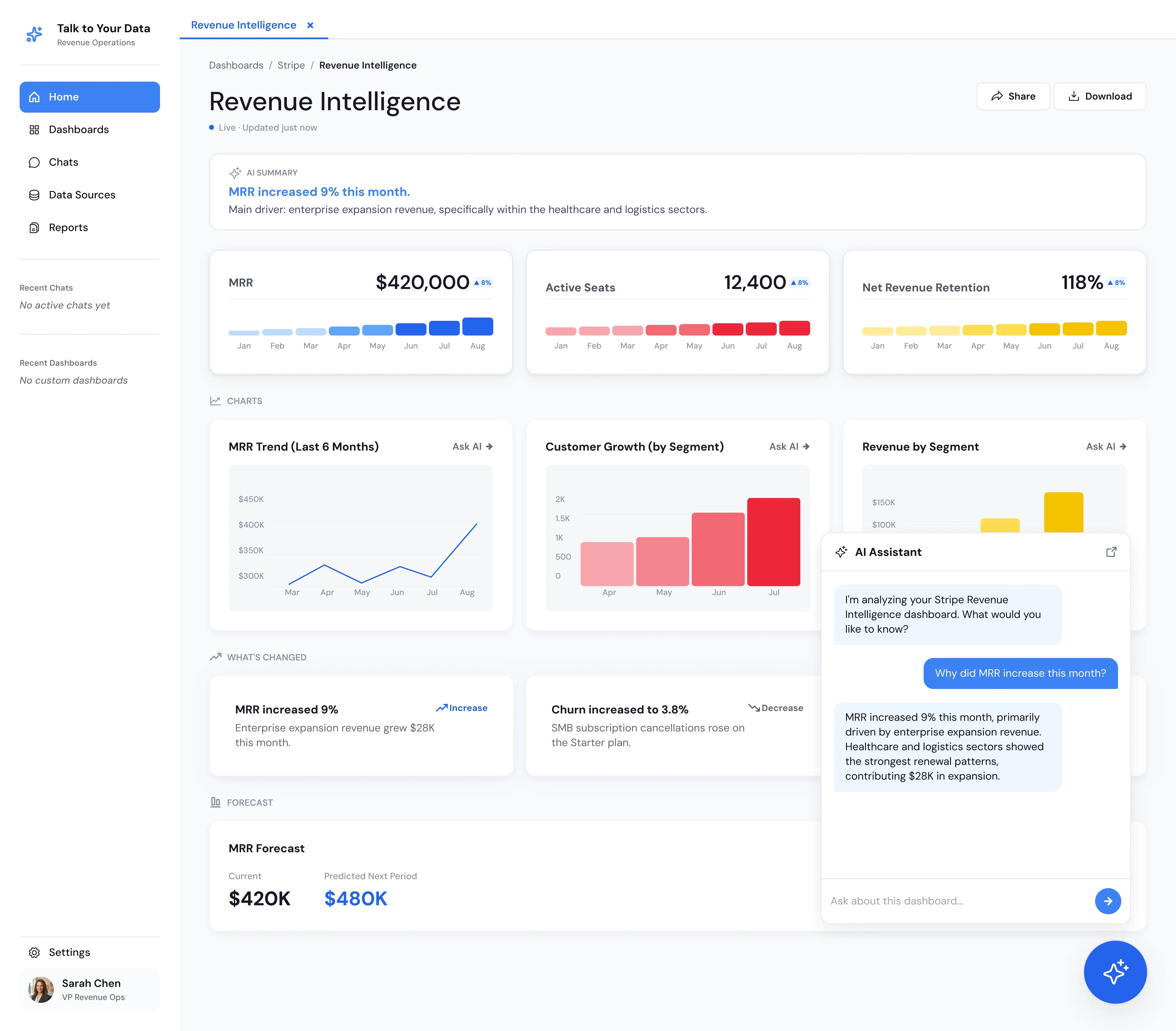
The agent queries the data layer, so answers are not limited by what an API, connector, or MCP server exposes.
Metrics, entities, schema relationships, and sensitivity context are configured with your team.
Each result returns the business definition, source systems, filters, freshness, and query logic.
Follow-ups keep the metric, period, region, and account in context.
Permissions and data boundaries are set before any user gets access.
Recurring reports and workflow integrations deliver answers outside the chat window.
Pick a metric your team struggles to explain. Watch the agent interpret it, query your data, and show the sources, filters, and logic behind the answer.
Here is how an agent handles a typical finance question, in the four steps that make the result reviewable.
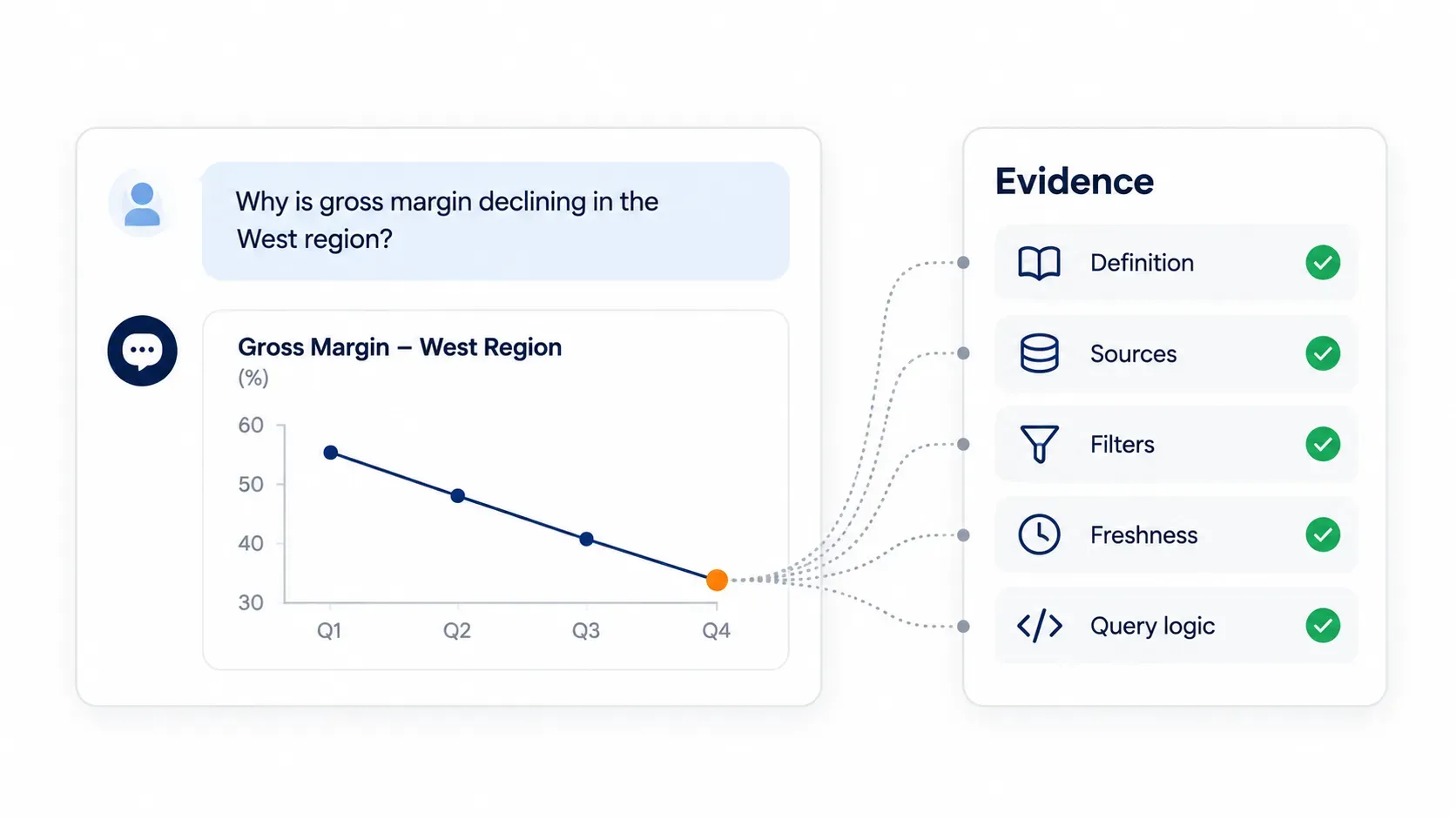
"Why is gross margin declining in the West region?"
| Evidence | What the agent returns |
|---|---|
| Business definition | Gross margin = (net sales minus COGS) / net sales x 100 |
| Source systems | Finance ERP, sales, returns |
| Filters applied | West region, previous completed quarter |
| Data freshness | Latest approved refresh |
| Query logic | Sales, COGS, freight and returns joined by region and period |
A controller can check every line in under a minute. That is the difference between an answer and a claim.
One governed model serves every team, each asking questions its dashboards were never built for.
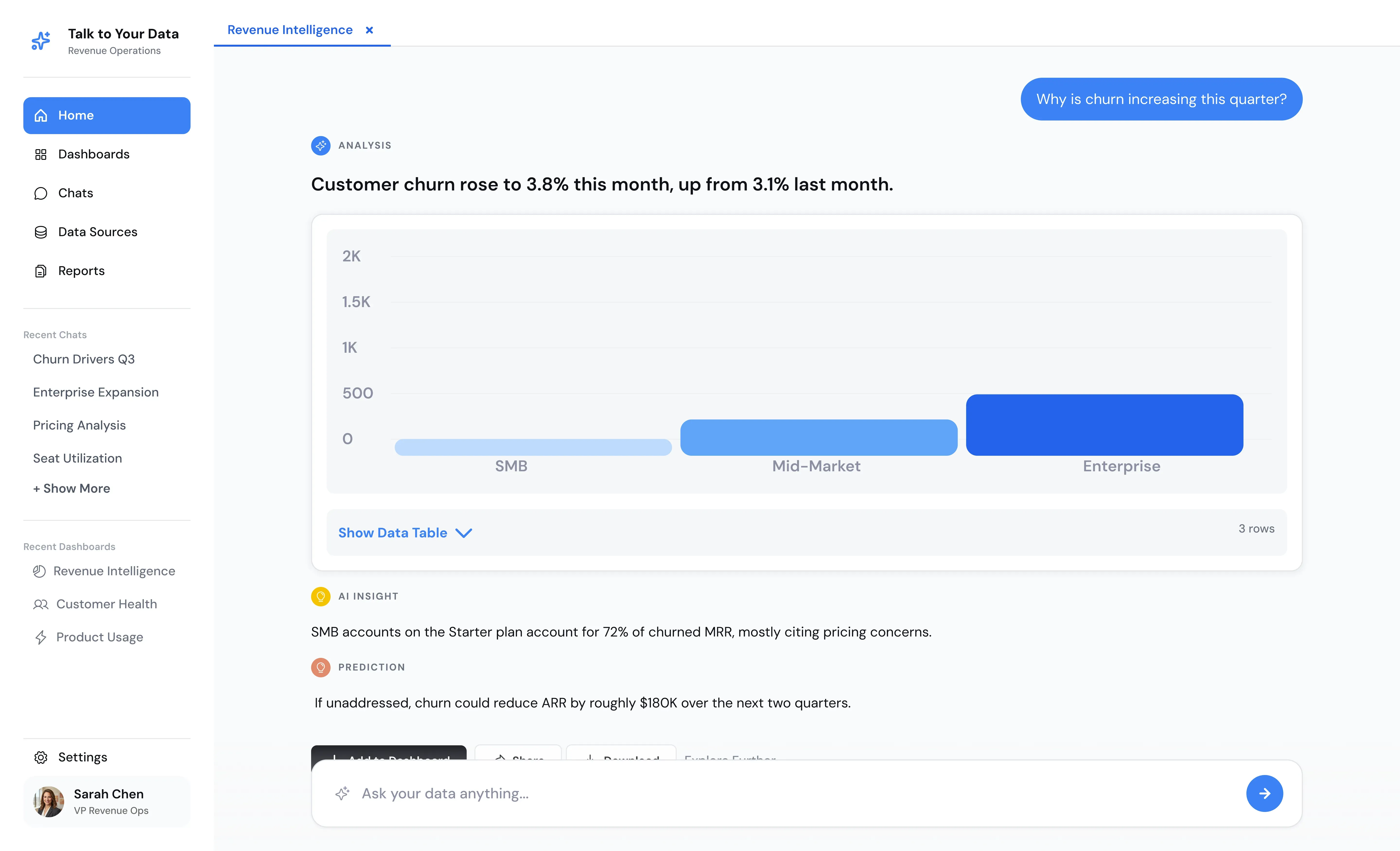
"Which three cost lines explain most of this quarter's variance against budget?"
"Which regions missed pipeline coverage targets, and which stage is stalling?"
"Which warehouses had the largest increase in late shipments since last month?"
"Summarize what changed this month across revenue, margin, and inventory."
Every engagement starts with one high-value data domain, and expansion follows only after real users validate the answers.
Choose one high-value data domain, validate it with real user questions in a pilot, and expand only after the answers prove reliable.
Most rollouts fail on the same few problems, and each has a design fix that beats extra training.
| Challenge | How Talk to Your Data handles it |
|---|---|
| Metric drift across teams | One semantic layer defines each metric for every user |
| Poor source data quality | Discovery profiles the first dataset before the agent goes live |
| Sensitive data overexposure | Permissions and data boundaries are set before rollout |
| Low adoption after launch | The pilot starts with questions users already ask |
| Guessed answers | Ambiguous questions trigger clarification |
| Dashboard sprawl without owners | Answers come from the shared model, not new one-off reports |
These seven practices separate rollouts that stick from those that drift back into the analyst queue within a quarter.
You do not always need a warehouse, but you need clean, accessible sources. An AI readiness assessment shows the gaps.
Finance or revenue usually has the clearest questions.
Agree on revenue, margin, and churn first.
Collect 30 to 50 from the people who will use it.
Mirror existing access rules instead of inventing new ones.
Make traceability a launch requirement.
Watch which questions fail, then add data or definitions.
The Folio3 team configures Talk to Your Data on your approved databases, builds the semantic layer with your finance and operations owners, validates answers with a pilot group, and hands over a working agent in four weeks.
"An analytics answer earns trust when someone can retrace it. If a CFO can't see which definition of margin the agent used, which tables it joined, and how fresh the data was, a two-second answer is worth less than a two-day report. Speed only counts once the evidence is there."
Folio3's work runs under an ISO 27001-certified information security management system, which governs access to client environments and data handling during the build.
20+ years in business and 150+ organizations using Folio3 software and AI solutions.
Self-service analytics is moving from dashboards toward conversational agents, yet the interface matters least. What decides adoption is whether people trust the number in front of them, and that means seeing the definition, sources, filters, and freshness behind it. Score vendors on traceability first, cost second, and features third. Run the five-question trust test before you sign anything. Then start narrow with one high-value dataset and expand once the answers prove reliable.
It lets business users answer questions about revenue, margin, pipeline, or operations without SQL or an analyst request. Teams use it for ad hoc analysis, drill-downs, and recurring reports on governed data.
Traditional BI routes every question through an analyst who builds the report. A self-service platform lets the business user ask directly while the data team maintains metrics, access, and governance.
List prices start around $14 to $15 per user per month for per-seat tools, while quote-based and package models vary with scope. Total cost also includes modeling, administration, training, and exit costs, which often exceed the license.
No. Conversational and search-based tools accept plain-language questions. Technical teams still connect sources, define metrics, and validate the system before users get access.
Check whether the answer shows the business definition, source systems, filters, data freshness, and query logic. If any of those are missing, treat the number as unverified until an analyst confirms it.
Not always, since some tools and AI data agents query operational databases directly. A warehouse helps when you need to combine many sources, but clean and accessible source data matters more.
It usually complements them. Dashboards track recurring KPIs, and an agent answers the follow-up questions they cannot. Many teams retire low-use dashboards once those questions move into conversation.
Bring one real question and one dataset. See how Talk to Your Data finds the answer, shows its evidence, and handles the follow-up. Leave with a clear view of whether your first data domain is ready for a four-week pilot.
Written by the Folio3 AI Editorial Team. Technical content on platform criteria, answer traceability, and governance was reviewed by Abdul Sami, Head of AI Development at Folio3, in October 2026.
Fill the form below or Contact us at +1 408 365-4638 / email us via contact@folio3.ai
Years of Engineering Excellence
Projects Delivered Worldwide
Client Satisfaction
Build | Govern | Scale
Response Guaranteed

+1 408 365-4638
contact@folio3.ai

6701 Koll Center Parkway, #250 Pleasanton, CA 94566