
Natural language meets business data
A query planner maps words like "revenue" or "West region" to tables, columns and filters.
Ask business questions in plain English and get answers from your own data. Compare the top conversational analytics software of 2026 and see what separates trusted answers from plausible guesses.
Conversational analytics software lets business users ask questions about company data in plain English and get back an answer, a chart, and the logic behind it, without writing SQL. The strongest tools ground answers in governed metric definitions so repeated questions resolve to the same business logic, instead of forcing the model to reinterpret the metric each time.
Gartner predicts 75% of new analytics content will be contextualized through generative AI by 2027, and that 60% of agentic analytics projects relying solely on MCP will fail by 2028 without a consistent semantic layer.
Conversational analytics is the practice of querying business data through natural-language questions instead of dashboards or SQL. An AI layer interprets the question, queries approved data, and returns an answer the user can follow up on in the same thread.
A query planner maps words like "revenue" or "West region" to tables, columns and filters.
"Which SKUs sold below margin last month?" returns a ranked table from the ERP.
"Now only Texas" keeps the metric, period, and grouping from the previous question.
Half the search results for this term describe contact-center software that analyzes calls; the other half describe tools for questioning business data. Buyers, data and outputs barely overlap.
Finance, sales and operations users question ERP, CRM and warehouse data. Most vendors call this chat with your data.
CX teams analyze transcripts, often called conversation intelligence or speech analytics.
| Analytics via conversation | Analytics of conversations | |
|---|---|---|
| Data analyzed | ERP, CRM, finance and warehouse tables | Call recordings, chat logs, emails |
| Typical buyer | CFO, RevOps, COO, data team | CX leader, contact-center director |
| Typical tools | AI data agents, BI copilots | Conversation intelligence and speech analytics suites |
| Output | Metrics, trends, root-cause answers | Sentiment, topics, QA scores, compliance flags |
This page covers analytics via conversation. For call analysis, skip to conversation intelligence tools.
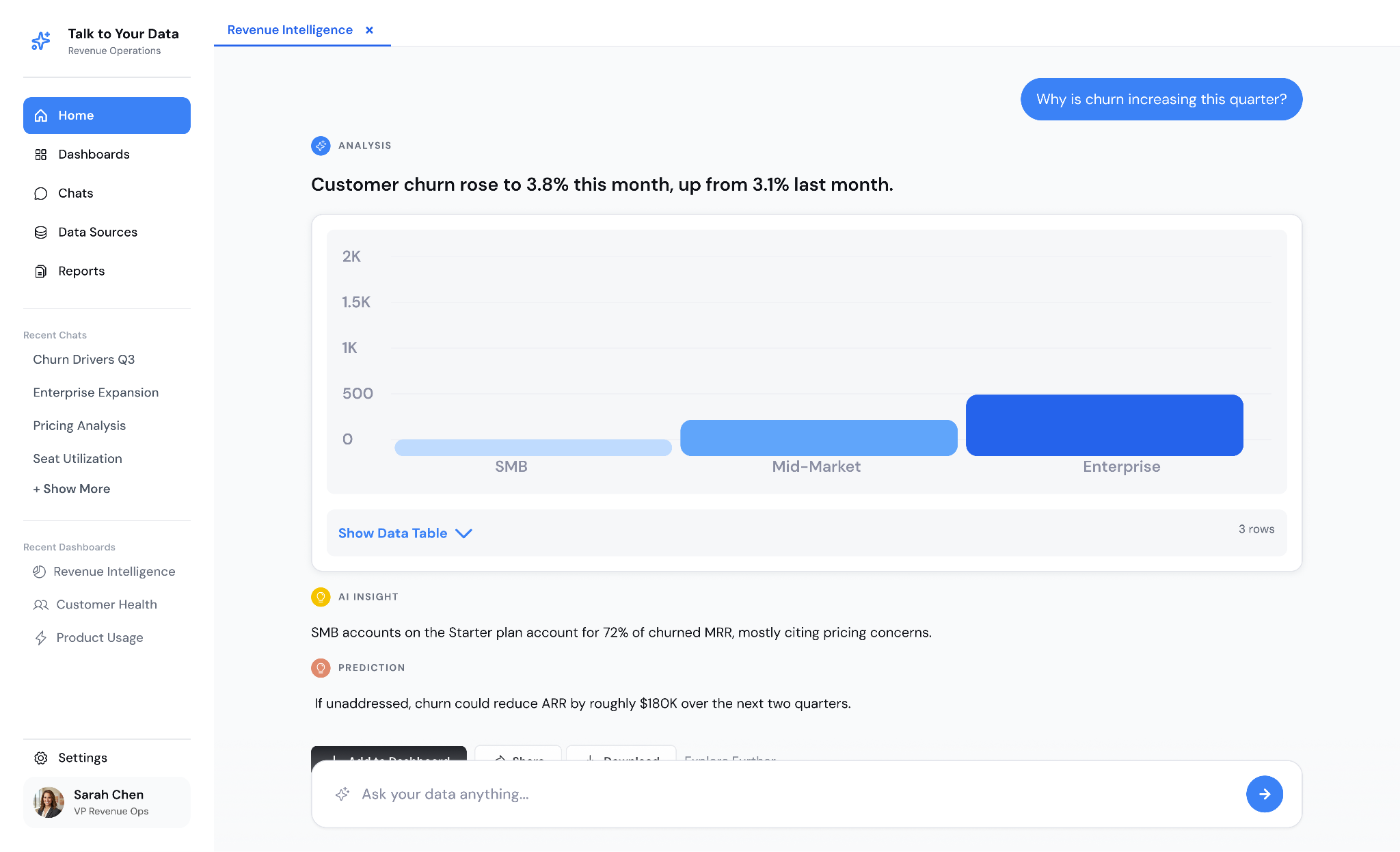
Conversational analytics software, sometimes sold as conversational analytics AI software, turns a typed business question into a governed database query and returns the result with its evidence. It is the newest form of self-service analytics software: business users get answers without filing a report request. Four layers sit under the chat window: the interface, the query engine, the semantic layer, and the data connections.
Users ask questions in a web app, Slack, or Microsoft Teams, with no report designer or SQL editor to learn. The interface keeps session state. A follow-up like "only Q3" inherits the metric, period, and filters from the previous turn instead of starting a fresh query.
What to check: whether user permissions follow people into Slack and Teams, or apply only inside the vendor's web app.
A large language model (LLM) parses intent: the metric, the entities, the time range and the comparison asked for. A planner then compiles that intent into one of two forms. It can write SQL directly, or it can call an AI semantic layer that already holds the joins and metric formulas.
| Approach | How the query gets built | Typical failure |
|---|---|---|
| Raw text-to-SQL | The LLM writes SQL from table and column names | Plausible SQL on the wrong join or metric |
| Semantic-layer query | The LLM picks certified metrics and dimensions, and the layer compiles the SQL | Refuses questions the model doesn't cover |
What to check: whether you can open the generated SQL or query plan behind any answer.
Typical sources include NetSuite, Dynamics 365, Salesforce, Snowflake, Databricks, BigQuery, and SQL Server. How the tool connects matters as much as which sources it lists:
A complete response has four parts:
Without the evidence, a finance lead can't tell a correct 3.8-point margin drop from one calculated on gross instead of net sales.
Vendors use these labels inconsistently. For this guide, we distinguish them by how much modeling, governance, and implementation responsibility sits with the buyer versus the provider. The table below is Folio3's working classification, not an industry taxonomy.
| Term | What you get | Where modeling and governance responsibility sits | Example |
|---|---|---|---|
| Software | A chat-to-query tool over your existing data | Mostly with the buyer's data team | A BI copilot switched on over an existing semantic model |
| Platform | Software plus modeling, governance and APIs that other apps call | Buyer's data team, inside the vendor's modeling layer | A semantic-layer product serving dashboards, chat and agents |
| Solution | Software configured around one company's systems, metrics and permissions | Shared: built with the provider, then handed to the buyer's team | A custom AI data agent over your ERP and CRM |
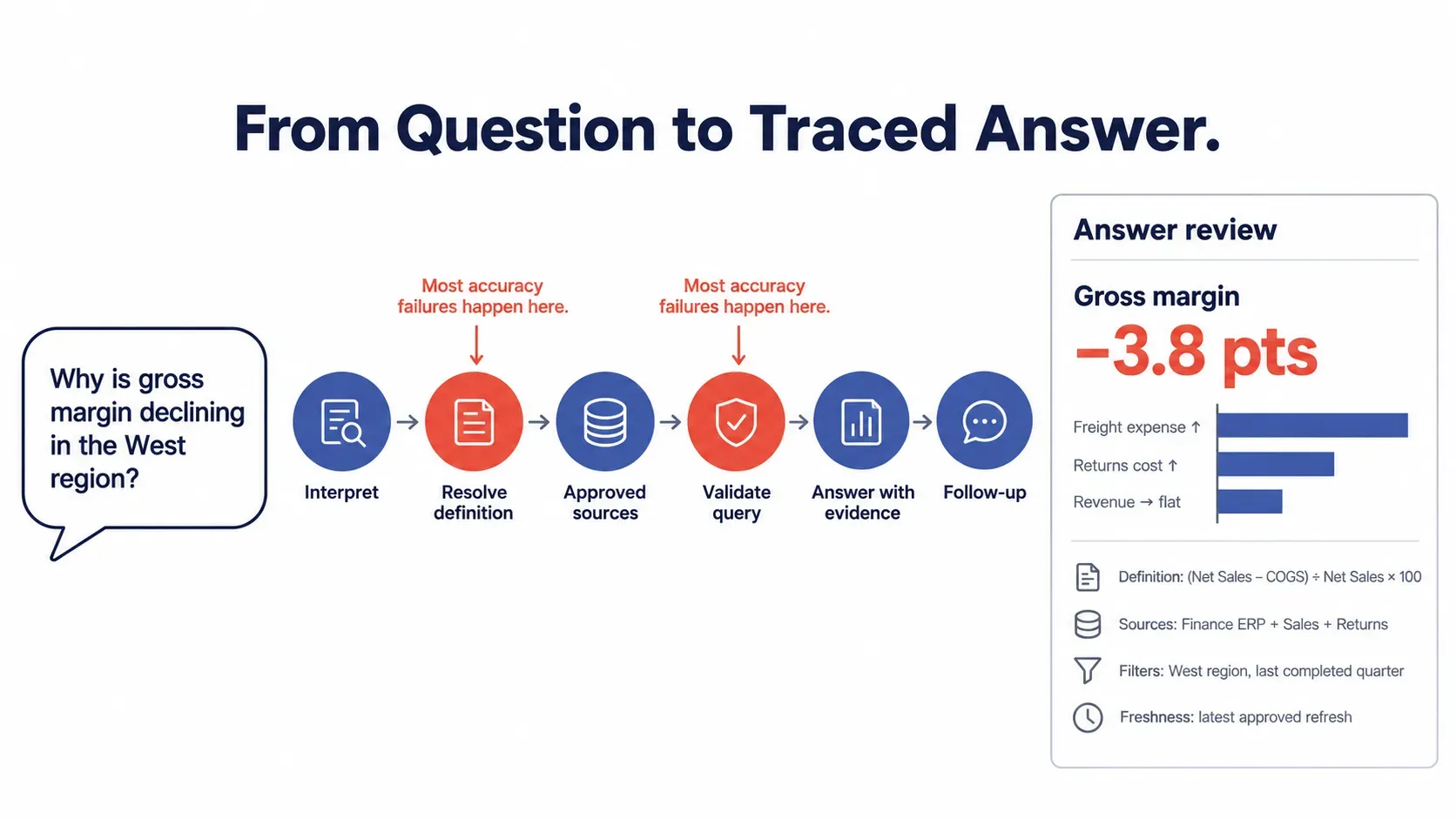
A governed conversational-analytics workflow typically includes six stages. Folio3 calls this the Folio3 Trusted-Answer Flow: interpret → resolve definitions → identify sources → generate and validate → return evidence → preserve follow-up context. Different products implement these stages differently, and some combine or skip them. In our experience, accuracy problems most often originate in stages 2 and 4.
Take the question: "Why is gross margin declining in the West region?"
Dashboards excel at recurring questions and monitored KPIs. The gap appears when the next question requires a dimension, relationship, or investigation path that was not modeled into the report. Raw text-to-SQL answers new questions but can guess at business logic. In both cases, business users often end up back in the analyst queue.
A sales VP sees churn tick up on Monday and asks for churn by contract size. If the dashboard doesn't include that cut, the request needs a ticket, a scoping thread, a SQL pull, and a chart. By the time the answer lands, the renewal meeting it was meant for may be over.
The cost: decisions get made on whatever report exists, not the one the question needed.
Ad hoc requests arrive unplanned, jump the queue, and are rarely reused. Each one interrupts forecasting, modeling, or data quality work, which is the work that makes every later answer better.
The cost: analyst hours shift from analysis to retrieval.
A dashboard is a fixed set of metrics, filters, and drill paths chosen when it was built. It can show that margin fell. "Why, and for which customers?" may need a dimension or join the designer never included, so it becomes another ticket or another dashboard tab.
The cost: dashboard sprawl grows while each report answers fewer of the questions people are asking today.
An LLM pointed at raw tables sees column names, not business rules, so it has to infer them:
| What the model must infer | Typical wrong guess |
|---|---|
| Revenue definition | Gross bookings instead of revenue net of returns and credits |
| Fiscal calendar | A calendar quarter instead of a 4-4-5 fiscal quarter |
| Join path | Order lines joined to invoices, double-counting split shipments |
| Active customer | Any login in 90 days instead of an active paid subscription |
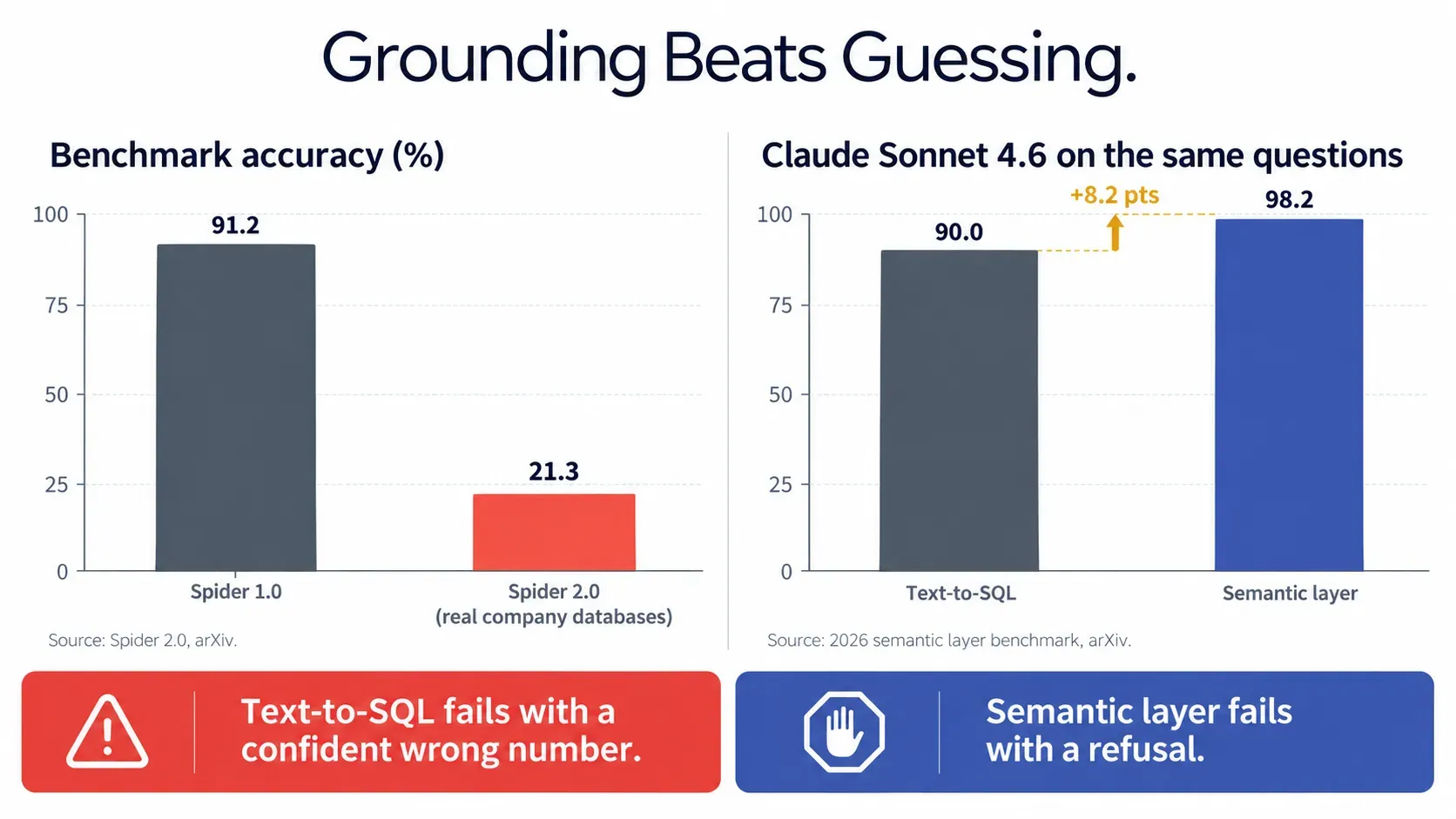
Spider 2.0 highlights how much harder realistic company data environments are than earlier text-to-SQL benchmarks. Its workflows involve larger schemas, multiple operations and more complex environments, and reported solve rates are substantially lower than on Spider 1.0. At publication, the best agent solved 21.3% of Spider 2.0 tasks, compared with 91.2% on Spider 1.0 (arXiv). The gap reflects a much harder benchmark, not a model that suddenly got worse.
Without fixed definitions, every prompt re-derives the logic. Two people asking about "active customers" an hour apart can get two different counts. Answers can also legitimately change because of new data, refresh timing, permissions or ambiguity, which is why good tools show freshness and definitions with every result.
In an April 2026 dbt Labs benchmark on a modeled project, semantic-layer queries raised Claude Sonnet 4.6's accuracy from 90.0% to 98.2%, and GPT-5.3-Codex from 84.1% to 100%, compared with text-to-SQL. The test used the ACME Insurance dataset with 11 business questions and 20 runs per model. dbt Labs sells a semantic layer, and results varied by model and test configuration, so treat the study as evidence that explicit business semantics can improve reliability, not as a universal 98% accuracy claim. Independent academic work, including a 2026 arXiv study, uses different setups and reports different absolute levels of accuracy.
The failure mode matters as much as the score. When text-to-SQL fails, it can produce a confident wrong number. When a semantic layer fails, it typically refuses to answer. A refusal costs a follow-up question. A wrong number can end up in a board deck.
The access method determines what data, history and relationships are available. APIs and connectors may omit fields or history; direct database access may expose more schema depth but requires stronger access, performance and governance controls. Gaps that come up often with API-based access:
API request limits can also cap how many rows a single answer can pull. Direct database access brings its own costs: security exposure, production load, schema complexity and maintenance.
The gains show up in three places: how fast decisions get made, where analyst hours go, and how many people use company data at all. Each gain depends on governed definitions. Without them, faster answers just spread inconsistent numbers faster.
A question raised during a pipeline review gets answered in that same review, follow-ups included. Answer time drops from days in a ticket queue to minutes in a thread.
Measure it: time from question to answer, before and after the pilot.
Routine pulls like "Q3 bookings by region" become self-service. Analysts keep the work that needs judgment: forecasting, model design, and investigating anomalies.
Measure it: monthly ad hoc request volume, and the share answered without an analyst.
Account managers, plant leads, and regional finance staff who never opened a BI tool start asking questions in Slack or Teams. Permissions decide what each person sees, so wider access doesn't mean wider exposure.
Measure it: weekly active users outside the data team.
Each answer starts the next question: region, then account, then invoice. Context carries through the thread, so one investigation replaces three tickets.
Measure it: average number of follow-up questions per session.
Define gross margin once in the semantic layer, give it a named owner, and every answer uses that definition. Finance and sales stop reconciling numbers before they can discuss them.
Measure it: how many conflicting metric definitions get retired during setup.
Score tools against this checklist before the demo. The first three decide trust; the rest decide adoption.
| Feature | Question to ask the vendor |
|---|---|
| Semantic layer (governed metrics, glossary, fiscal calendar) | Where do our definitions live, and who can change them? |
| Answer traceability | Can a user see sources, filters, and the query without asking IT? |
| Access control (row and role) | Are permissions applied before the query runs, from existing roles? |
| Context retention | How many follow-up turns does context survive? |
| Clarification handling | What happens when "customer" matches three tables? |
| Data freshness | Does every answer show its refresh timestamp? |
| Source coverage (ERP, CRM, SQL, warehouses) | Can one answer join NetSuite and Salesforce data? |
| Deployment options | Can it run inside our cloud account? |
This comparison is based on public vendor documentation and pricing information available in October 2026. Folio3 builds Talk to Your Data and discloses that conflict. No standardized hands-on benchmarks were run across every tool, so "watch-outs" describe documented architecture or buying considerations rather than performance rankings. Tools were reviewed on five criteria: answer accuracy and design (grounding, clarification), governance and permissions, traceability, data source flexibility, and pricing transparency.
Pricing checked in October 2026. The table shows pricing models, which change slowly. Exact rates change often, so confirm current prices on each vendor's site. Where a vendor publishes no price, we say quote-based.
| Tool | Best for | Data approach | Pricing model | Watch out for |
|---|---|---|---|---|
| Folio3 Talk to Your Data | Questions spanning ERP, CRM, finance | Approved data-layer access, custom semantic layer | Fixed-scope build plus runtime | Not a self-serve sign-up |
| ThoughtSpot (Spotter) | Search-first self-service | ThoughtSpot semantic model | Per-user tiers or usage-based | Upfront modeling |
| Power BI Copilot | Microsoft and Fabric teams | Power BI semantic model | Fabric or Premium capacity plus user licenses | Data outside the model |
| Tableau Next / Tableau Agent | Tableau and Salesforce estates | Tableau Semantics | Per-seat add-ons and bundles | Salesforce-centric |
| Looker with Gemini | Google Cloud, LookML teams | LookML | Platform edition plus licenses | LookML skills needed |
| Databricks AI/BI Genie | Lakehouse teams | Unity Catalog, Genie spaces | Usage-based (DBUs), warehouse compute billed separately | Compute billed separately |
| Snowflake Cortex Analyst | Snowflake-native teams | Semantic views | Usage-based credits, plus warehouse compute | Data must be in Snowflake |
| Sigma (Ask Sigma) | Spreadsheet-minded finance | Live warehouse workbooks | Quote-based | Needs a warehouse |
| Tellius | Automated root cause | Key driver analysis | Quote-based | No public pricing |
| Dot / Zenlytic | Standalone AI analyst | Warehouse plus context layer | Credit-based (Dot), quote-based (Zenlytic) | Needs a modeled warehouse |
Best for: questions that cross ERP, CRM, and finance systems.
Pricing model: $20K four-week engagement, then about $100 to $300 a month runtime (checked October 2026).
Watch out for: scope starts with one dataset.
Best for: search-style exploration of modeled data.
Pricing model: per-user tiers or usage-based, depending on edition.
Watch out for: upfront modeling.
Best for: companies standardized on Power BI and Fabric.
Pricing model: paid Fabric or Premium capacity plus Pro or PPU licenses.
Watch out for: raw ERP tables outside the model stay unanswerable.
Best for: Tableau-heavy teams running Salesforce.
Pricing model: per-seat add-ons and bundles.
Watch out for: most value lands inside Salesforce workflows.
Best for: BigQuery users with mature LookML models.
Pricing model: annual platform edition plus user licenses.
Watch out for: answer quality tracks LookML quality.
Best for: data governed in Unity Catalog.
Pricing model: usage-based in DBUs, with warehouse compute billed separately.
Watch out for: budgets that miss compute.
Best for: data models already in Snowflake.
Pricing model: usage-based credits, plus warehouse compute.
Watch out for: other systems must load into Snowflake first.
Best for: finance users who think in spreadsheets.
Pricing model: quote-based.
Watch out for: ERP data needs a pipeline into the warehouse.
Best for: "why did this change?" questions on large datasets.
Pricing model: quote-based.
Watch out for: comparisons need a sales call.
Best for: modeled warehouses, answers in Slack or a web app.
Pricing model: credit-based (Dot), quote-based (Zenlytic).
Watch out for: both assume a maintained context layer.
These analyze recorded calls and chats, not business data.
| Tool | What it analyzes |
|---|---|
| CallMiner | Calls, chats, email for compliance |
| Sprinklr | Voice, digital and social channels |
| NICE | Contact-center quality management |
| Observe.AI | Call QA scoring, agent assist |
| Gong | Sales calls for deal risk, coaching |
Each category is the right answer in some situations. Here is where each is strongest and what it costs you.
| Category | Strongest when | Trade-off |
|---|---|---|
| BI copilot (Power BI, Tableau, Looker) | Data is already modeled in the BI ecosystem | Limited by the existing semantic model |
| Warehouse-native AI (Snowflake, Databricks) | Data is centralized in Snowflake or Databricks | Works best inside that data platform |
| Standalone AI analyst (Dot, Zenlytic) | You want a fast conversational experience over a modeled warehouse | Requires a maintained context or model layer |
| Custom AI data agent | Workflows cross systems and rely on company-specific definitions | Higher implementation effort |
| Document chat (ChatGPT, Microsoft Copilot) | Questions are answered from unstructured content | Not designed for governed, live business metrics |
Talk to Your Data is a private AI data agent that Folio3 configures around your approved systems and metric definitions. It is one option in the custom-agent category above, and it is not the right fit for every team. For full product details, see the Talk to Your Data page.
Teams whose questions cross ERP, CRM and finance systems, with metric rules that differ by entity or region and no shared warehouse. Typical examples are NetSuite or Dynamics 365 for finance and Salesforce for sales.
Every response shows the definition, source systems, filters, data freshness, and query logic, and follow-ups keep the metric, period, and region in scope. A finance lead can check a number without opening a ticket.
"The failure we test hardest for isn't a refusal. It's a clean chart built on the wrong join. That's why every answer carries its definition, sources, and filters, so a finance lead can spot a bad number in ten seconds instead of in the board meeting."
The application is deployed in the customer's cloud environment, with data-flow and model-endpoint architecture agreed during deployment. The deployment is designed so credentials and application components can be removed without migrating the underlying source data.
Pilots work best when they start narrow, with one high-value dataset.
| Week | Focus | Output |
|---|---|---|
| Week 1 | Discovery and dataset selection | Dataset, question set, environment plan |
| Week 2 | Connect data, build semantic layer | Semantic model configured, agent deployed |
| Week 3 | Pilot with real users | Reviewed Q&A, refined rules |
| Week 4 | Expand and hand off | Production path, expansion backlog |
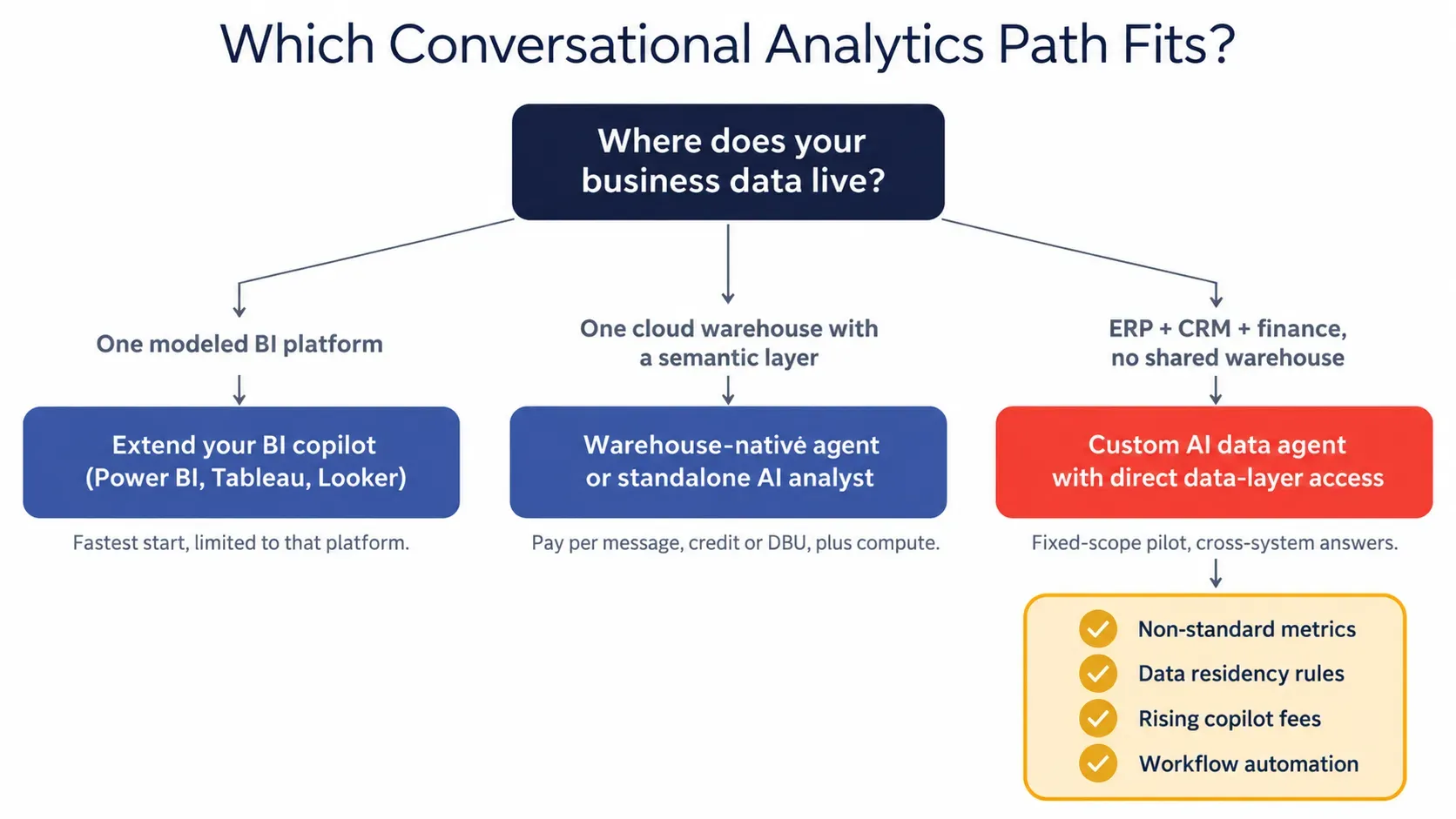
Talk to Your Data is not a self-serve sign-up, and scope starts with one dataset. If your data already sits in one platform, extending that platform's copilot is usually the faster and cheaper route.
Each team questions different systems. One sample question per team shows the range.
| Team | Focus | Sample question |
|---|---|---|
| Finance | Margin, variance, P&L | "What changed in operating margin, and which cost centers explain it?" |
| Sales and revenue | Pipeline, account risk | "Which accounts are slipping, and what changed in their activity?" |
| Operations | Inventory, delays, exceptions | "Where are service delays increasing, and what do the affected cases have in common?" |
| Executive teams | Cross-functional changes | "What changed this month across revenue, margin, inventory and customer risk?" |
| Supply chain | Suppliers, freight | "Which suppliers missed delivery windows most this quarter, and what did it add to freight cost?" |
Most guides assume a cloud warehouse. Many mid-size companies run finance in NetSuite or Dynamics 365 and sales in Salesforce, with nothing in between.
NetSuite exposes read access through SuiteAnalytics Connect (ODBC/JDBC); Dynamics 365 through the Dataverse SQL endpoint or Azure Synapse Link. Subsidiaries and custom fields map into the semantic layer.
Without field history tracking, an agent sees only each opportunity's current stage.
"Which closed-won deals have unpaid invoices?" needs Salesforce accounts mapped to ERP customers.
REST APIs page through objects under request limits and may skip history tables, while database access can query data where it lives but needs stronger permissions, query-cost limits, and a read replica to protect production load. The right choice depends on which fields and history your questions need and what your security team will approve.
Six steps take most teams from longlist to decision in about a month.
Demos use tidy sample data. Ask these seven on your own data.
| Test | Ask this | A trustworthy tool | Red flag |
|---|---|---|---|
| Ambiguous metric | "How many active customers do we have?" | Asks which definition applies, or names it | A number with no definition |
| Cross-system join | "Which closed-won deals have unpaid invoices?" | Joins CRM and ERP on a mapped key | Answers from one system |
| Permission boundary | As a regional manager, request another region's payroll | Refuses or returns permitted rows only | Returns the full table |
| Follow-up context | "Now only accounts over $100K ARR" | Keeps metric and period, adds the filter | Drops the period |
| Freshness | "What were sales yesterday?" | Shows the refresh timestamp | Silent on data age |
| Out of scope | Ask about an unconnected table | Says it can't answer | Invents a plausible number |
| Repeatability | Same question, an hour apart | Same business logic and number, or an explained change in data | Two different numbers with no explanation |
Fail the permission or out-of-scope test and a tool shouldn't touch finance data.
Off-the-shelf tools win when data sits in one platform. A custom agent earns its cost when these hold.
Vendors bill on different meters, so list prices rarely compare cleanly. Pricing checked October 2026.
| Pricing model | Examples | What drives the bill |
|---|---|---|
| Per-user licensing | BI copilots, ThoughtSpot seat tiers | Seat count and user type |
| Usage- or credit-based | Dot, Databricks Genie, Cortex Analyst | Questions asked, analysis depth |
| Capacity based | Power BI Copilot on Fabric, warehouse compute | Compute units consumed |
| Quote-based | Sigma, Tellius, Zenlytic | Negotiated per customer |
| Fixed-scope build | Folio3 Talk to Your Data | $20K for four weeks, then $100 to $300 a month |
Hidden costs: semantic modeling time, viewer licenses, warehouse compute and analyst hours verifying pilot answers.
Stalled rollouts usually hit one of five problems.
| Challenge | Fix |
|---|---|
| Hallucinated answers | Ground every query in a semantic layer; refuse out-of-scope questions |
| Inconsistent metrics | Certify each definition once, with a named owner |
| Permission leaks | Enforce access before the query runs, not in the prompt |
| Poor data quality | Start with the cleanest domain; an AI readiness checklist shows the gaps |
| Low adoption | Launch with the questions people already email analysts about |
Check these five controls before a pilot touches production data.
Folio3 holds ISO 27001 certification. For policy, see the guide to AI governance and compliance; for LLM usage across teams, AI Guardian adds spend caps, model permissions, and request-level logs.
Four shifts already show up in 2026 product releases.
Agentic multi-step investigations: several planned queries per "why" question.
Proactive scheduled insights: summaries triggered by metric changes, before anyone asks.
MCP and agent interoperability: a standard way to call data tools, with meaning still supplied by the semantic layer.
Answers delivered in Slack and Teams: analytics inside the threads where decisions happen.
Conversational analytics means two different things. For business data, the chat interface matters less than what sits behind it: governed definitions, enforced permissions, and answers that show their work. If your questions span several systems, Talk to Your Data was built for that case.
Querying business data through natural-language questions instead of dashboards or SQL. The term also describes analyzing customer calls.
Software that turns plain-English questions into governed queries on ERP, CRM, and warehouse data. Good tools return each answer with its evidence.
Conversational analytics answers questions about business data. Conversation intelligence analyzes recorded calls and chats for sentiment and compliance.
Text-to-SQL turns a prompt into a query. Conversational analytics adds governed definitions, permissions, follow-up context, and evidence.
It depends on where data lives. BI copilots suit single-platform teams; warehouse-native tools suit Snowflake or Databricks shops; cross-system ERP and CRM questions suit a custom agent like Talk to Your Data.
Pricing runs per user, message, capacity unit, quote, or fixed build. Talk to Your Data costs $20K for four weeks, plus $100 to $300 monthly runtime (checked October 2026).
Yes, through read-only database access, warehouse syncs or APIs. Database access can reach history tables that APIs may omit, but it needs stronger access, performance and governance controls.
Accuracy varies by schema, question set, semantic coverage and model. Controlled 2026 benchmarks from dbt Labs and independent researchers show that explicit business semantics can materially improve text-to-SQL accuracy, but those results should not be treated as universal production accuracy. Test vendors against your own verified question set.
No. Dashboards suit recurring KPIs; conversational tools handle follow-up and ad hoc questions.
BI copilots switch on in days with a clean model. A custom agent on one dataset takes about four weeks.
It can be, provided the architecture enforces identity, source-level permissions, sensitive-field controls, audit logging, approved model endpoints and appropriate deployment boundaries.
No. Read-only database access can work directly on ERP and CRM systems; a read replica protects production load.
Folio3 Talk to Your Data connects to your approved business systems, applies your metric definitions, and returns answers your finance, sales, and operations teams can verify for themselves.
Written by the Folio3 AI Editorial Team, with expert input from Muhammad Nasir, Senior Project Manager. Technical content reviewed by Abdul Sami, Head of AI Development at Folio3 AI, in October 2026.
Fill the form below or Contact us at +1 408 365-4638 / email us via contact@folio3.ai
Years of Engineering Excellence
Projects Delivered Worldwide
Client Satisfaction
Build | Govern | Scale
Response Guaranteed

+1 408 365-4638
contact@folio3.ai

6701 Koll Center Parkway, #250 Pleasanton, CA 94566