
Data integration: read access
The agent reads records and documents to build context before it answers or acts. The main risk is exposure, since a retrieved record can reach the model, the logs, and the wrong user.
Most AI agents can talk well before they can safely finish work. An agent that drafts a reply still leaves the job to a person if it can't check the order, update the ticket, or post the credit. AI agent integration closes that gap, and it is also where most of the risk sits.
AI agent integration is the work of connecting an agent to business systems so it can read live data and call approved tools.
Read access gives an agent context. Write access gives it real work, and most of the risk.
Governance is a separate layer. It decides which of those calls are allowed, for whom, with what approval, and how they are logged. You need both, but they are designed, owned, and often bought separately.
Choose a platform when your engineers can own the tools and your systems have good APIs. Choose an integration company when workflows cross legacy systems, need write access, or face audits.
| Role | Main question | Start with |
|---|---|---|
| CIO | Which workflows justify agents, and what will they cost to run? | Why agents need integrations; Build, buy, or partner |
| CTO | Which pattern and platform fit our architecture? | Integration patterns; Platforms compared |
| Engineering leads | How do we build tools that fail safely? | Risk map; Implementation steps 4 to 7 |
| Security and risk | Who is acting, with what scope, and what is logged? | Securing and governing integrated agents |
| Operations owners | What changes for my team, and when do people stay in the loop? | Readiness checklist; Step 8 rollout stages |
AI agent integration gives an agent access to structured databases, unstructured documents, event streams, and third-party SaaS apps through defined tools. It has three stages, and each carries a different level of risk.
The agent reads records and documents to build context before it answers or acts. The main risk is exposure, since a retrieved record can reach the model, the logs, and the wrong user.
The agent assembles a change without committing it. Examples include a drafted customer email, a staged journal entry, or a proposed CRM update. A person or a deterministic rule then commits it. This stage delivers much of the time-saving with far less risk, and many production agents should start here.
The agent creates, updates, or sends something in a system of record, such as a CRM update, a closed ticket, or a posted invoice. A bad write outlasts the conversation that caused it.
The line is blurrier than it looks. Most agent stacks still run deterministic code, and many API integrations already act for users. The differences below are typical tendencies, not absolutes.
| Dimension | Traditional API integration | AI agent integration |
|---|---|---|
| Caller | Usually deterministic code | Often a model choosing tools at runtime, wrapped in code |
| Inputs | Usually validated by schema | Generated arguments that also need validation |
| Identity | Often a service account | More often acts for a specific user |
| Failure | Usually an error code with a known retry | Can also look like success |
| Testing | Unit and contract tests | Those, plus evaluations and red-teaming |
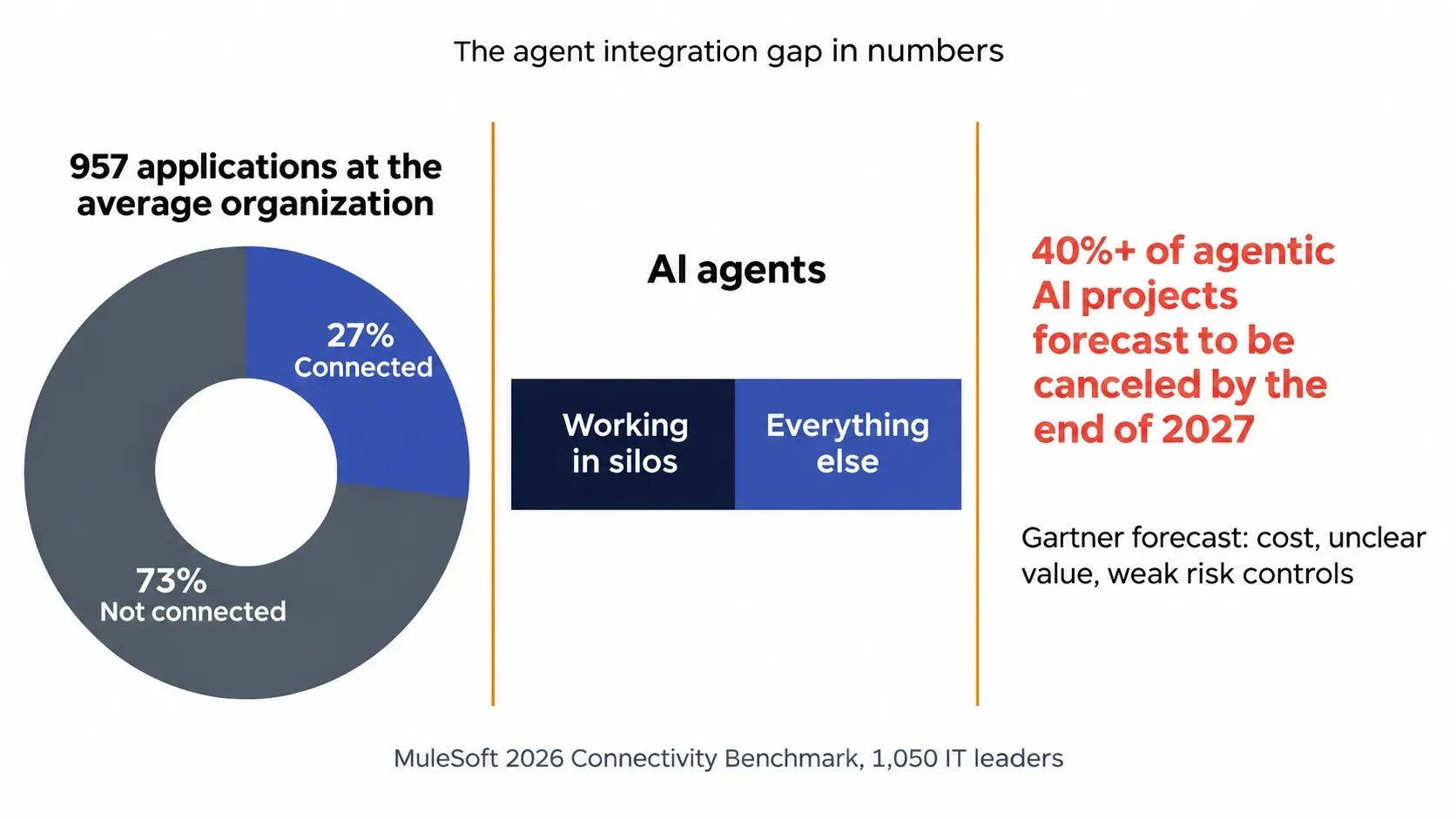
An unconnected agent can only talk. MuleSoft's 2026 Connectivity Benchmark surveyed 1,050 IT leaders. It found organizations run 957 applications on average, only 27% of them are connected, and half of agents work in silos.
Gartner predicts that over 40% of agentic AI projects will be canceled by the end of 2027. It cites escalating costs, unclear business value, and inadequate risk controls.
Agents earn their cost when a task needs judgment, such as reading unstructured input, choosing between paths, or handling exceptions. If a workflow follows the same fixed rules every time, keep it as conventional automation. A rules engine or iPaaS flow is usually cheaper, faster, and easier to audit than an agent.
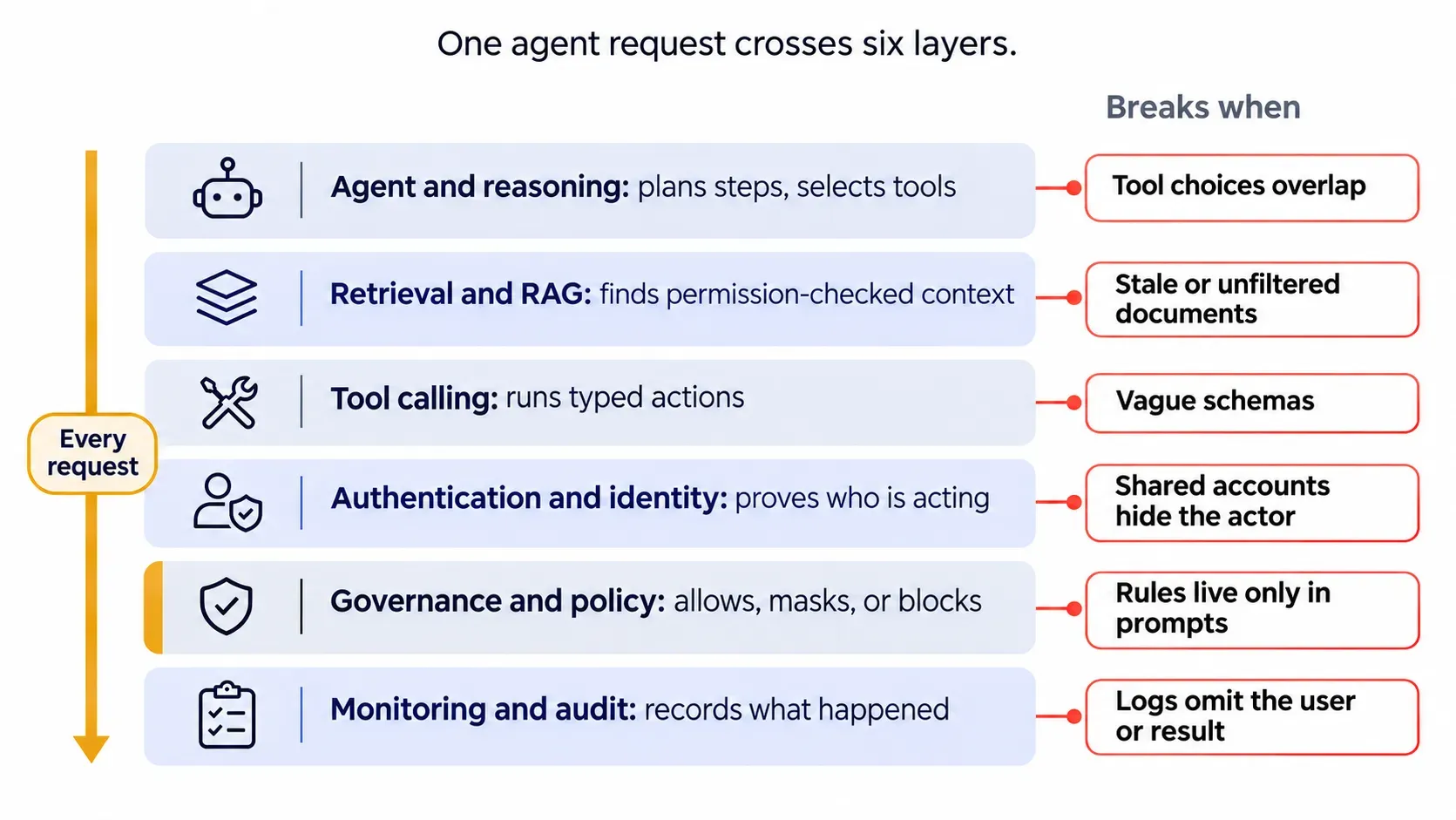
A typical production architecture has six layers. A simple read-only agent may skip some of them, while write-heavy agents usually need all six. Each row shows the layer's job and how it usually breaks.
| Layer | Job | Typical components | Breaks when |
|---|---|---|---|
| Agent and reasoning | Plans steps, selects tools | LLM, LangGraph | Tool choices overlap |
| Retrieval and RAG | Finds permission-checked context | pgvector, Pinecone | Documents are stale or unfiltered |
| Tool calling | Runs typed actions | Function schemas, MCP servers, APIs | Schemas are vague |
| Authentication and identity | Proves who is acting | OAuth 2.1, SSO, token vault | Shared accounts hide the actor |
| Governance and policy | Allows, masks, or blocks | Gateway, policy engine | Rules live only in prompts |
| Monitoring and audit | Records what happened | Traces, SIEM export | Logs omit the user or result |
RAG answers "what do we know?" and tool calling answers "what should change?" Most production agents need both.
Most agent projects stall at the integration layer. Bring one workflow and get a clear view of the systems, permissions, and connections it needs before any build starts.
Eight patterns cover most production builds, and teams often combine them. The right mix depends on how many systems you connect, how good their APIs are, and the maintenance you can absorb.
Direct API calls: your code calls a known endpoint.
Tool and function calling: the model picks from typed tools, and your code executes them.
MCP servers and gateways: Model Context Protocol standardizes how agents discover and call tools; a gateway adds central control.
Unified APIs: one normalized schema covers a category such as CRM or HRIS.
Embedded iPaaS workflows: the agent triggers prebuilt multi-step automations.
Event-driven triggers: webhooks or queues start the agent when something changes.
Agent-to-agent (A2A) protocols: agents hand tasks to each other in multi-agent systems.
Browser agents for legacy systems: the agent operates a web interface when no API exists.
| Pattern | Best for | Maintenance load | Governance effort |
|---|---|---|---|
| Direct API calls | A few critical systems | High per system | Low to medium |
| Tool and function calling | Custom agent logic | Medium | Medium |
| MCP servers and gateways | Many tools shared across agents | Medium | High without a gateway |
| Unified APIs | Many apps in one category | Low | Medium |
| Embedded iPaaS workflows | Repeatable multi-step processes | Low to medium | Medium |
| Event-driven triggers | Time-sensitive work | Medium | Medium |
| A2A protocols | Multi-agent handoffs | Medium | High |
| Browser agents | Systems with no API | High | High |
MCP standardizes how agents connect to tools, and its security model has matured quickly. The 2026-07-28 specification hardened authorization in several ways:
The rule against unsafe token passthrough still stands. MCP servers must reject tokens that were not issued for them and must not forward client tokens to upstream APIs.
What MCP does not define is your business policy. Which tools a given user's agent may call, which actions need approval, what gets redacted, and what is logged for audit all remain your design work.
These eight platforms solve the same problem by different routes. The right one to evaluate depends on your agent and your systems.
An AI agent integration platform is managed software that gives agents authenticated access to third-party tools. It handles tokens, tool definitions, and execution.
Platform vs MCP: MCP is a protocol, while a platform is a product that may use MCP.
Platform vs agent framework: LangGraph or CrewAI defines agent logic; a platform connects that logic to outside systems.
Platform vs traditional iPaaS: classic iPaaS runs fixed workflows, while agent platforms expose tools a model selects at runtime.
The categories are converging. iPaaS vendors now expose MCP servers and agent-callable actions, and agent platforms are adding workflow builders. Vendor category matters less than one design question for each step: should code follow a fixed path, or should a model choose the tool at runtime? Many teams use both, with iPaaS for fixed sequences and an agent layer for the judgment calls.
This comparison uses public vendor documentation reviewed in November 2026.
| Platform | Type | Best for | What to verify | Hosting |
|---|---|---|---|---|
| Composio | Action layer | Broad agent tool catalog | How far managed toolkits can be scoped or customized | Cloud; self-host on top tier |
| Arcade.dev | Action runtime | Per-user tool authorization | Setup effort relative to your auth needs | Cloud, VPC, on-prem, air-gapped |
| Nango | Code-first | Code-owned integrations | Engineering time to build and maintain integrations | Cloud, your cloud, self-managed |
| Merge Agent Handler | Governed connectors | Governed connectors with DLP | How Agent Handler and the Unified API are scoped and licensed | Cloud; on-prem on top tier |
| Pipedream Connect | API and workflow layer | Broad APIs plus workflows | Roadmap and terms under Workday ownership | Cloud; self-hosted MCP server |
| Paragon ActionKit | Embedded API | Embedded SaaS integrations | Fit for standalone agents, not only in-product integrations | Cloud or self-hosted |
| Workato | iPaaS with MCP | Existing automation programs | Cost and setup effort for lighter use cases | Managed cloud |
| Zapier MCP | Hosted MCP | Fast setup, wide app coverage | Connector control and task usage per call (currently two tasks) | Cloud only |
Pipedream is now part of Workday, as noted in Workday's fiscal 2026 results. Confirm pricing and catalogs with each vendor.
Answer these six questions for one real workflow, because a platform that fits an internal helpdesk may fail a customer-facing product.
| Question | How the answer steers you |
|---|---|
| Customer-facing or internal agents? | Customer-facing agents need per-customer auth |
| How many systems, and how good are their APIs? | A few systems with clean APIs may not need a platform |
| Read-only, propose, or write actions? | Writes need per-user identity, approvals, and idempotency |
| Code ownership requirements? | Keep logic in your repo with code-first tools |
| Data residency and hosting? | Rule out what can't run in your region |
| Total cost over time? | Model calls, connections, and engineer hours at production volume |
Each route has real costs, and many teams mix them, using a platform for common SaaS apps and custom work for the systems that matter most.
| Factor | In-house build | Integration platform | Integration company |
|---|---|---|---|
| Control | Full | Bounded by the vendor | Full, if code and IP handover is agreed |
| Speed to first release | Slowest | Fastest for catalog apps | Depends on scope and team experience |
| Speed to change later | Fast, if the team stays | Fast within the catalog | Depends on handover or support terms |
| Skills needed | Agent, API, and security engineers | Tool and test engineers | Product owner, system admins, and an internal owner after handover |
| Maintenance owner | Your team | Vendor for connectors, you for tools | Set by contract |
| Main risk | Hiring, retention, and slow delivery | Lock-in and catalog gaps | Dependency and weak knowledge transfer |
| Best fit | A small number of core integrations with a strong team | Common SaaS apps | Legacy, regulated, or write-heavy work |
A platform gives you connectors, but someone still has to design the tools, permissions, and failure handling. Folio3 engineers can build that layer with your team.
These problems recur across agent integration projects, and each has a design-level fix.
| Challenge | What happens | Fix |
|---|---|---|
| Permission sprawl across systems | Pilot scopes reach production | Review scopes before launch and on a schedule |
| Prompt injection through tools | Hidden text in a ticket steers the agent | Treat tool output as untrusted |
| Credential and token exposure | Tokens land in prompts or logs | Use a token vault and short-lived tokens |
| Ambiguous data schemas | The agent writes the wrong field | Describe fields and enums precisely |
| Overlapping tools | The agent picks a similar but wrong tool | Merge or rename tools; state when not to use each |
| API changes breaking agents | A renamed field fails quietly | Run contract tests on a schedule |
| Legacy systems without APIs | The agent can't reach records | Wrap the system or use a browser agent |
| Rate limits and retries | Retry storms lock the account | Add backoff and circuit breakers |
| Duplicate writes after timeouts | A retried call posts the entry twice | Use idempotency keys and check status first |
| Silent tool call failures | The agent reports success anyway | Read the result back before confirming |
| Stale context | Cached data drives a wrong write | Re-read the record before any write |
| Runaway loops and cost | The agent calls tools repeatedly | Cap steps, calls, and spend per task |
| Approval fatigue | Reviewers approve without reading | Route only consequential actions to people |
Broad write access can fail expensively. In a widely reported July 2025 case, SaaStr founder Jason Lemkin said a Replit agent deleted his production database during a code freeze. It is one account, not a measured failure rate. It still shows what happens when an agent holds destructive permissions without a hard stop. See more examples in Can AI go rogue?
Governance decides what an agent may do with its access. It should run on each request instead of living in a policy document.
A working connector proves an agent can reach a system, nothing more. The OWASP Top 10 for Agentic Applications lists tool misuse and identity abuse among its top risks.
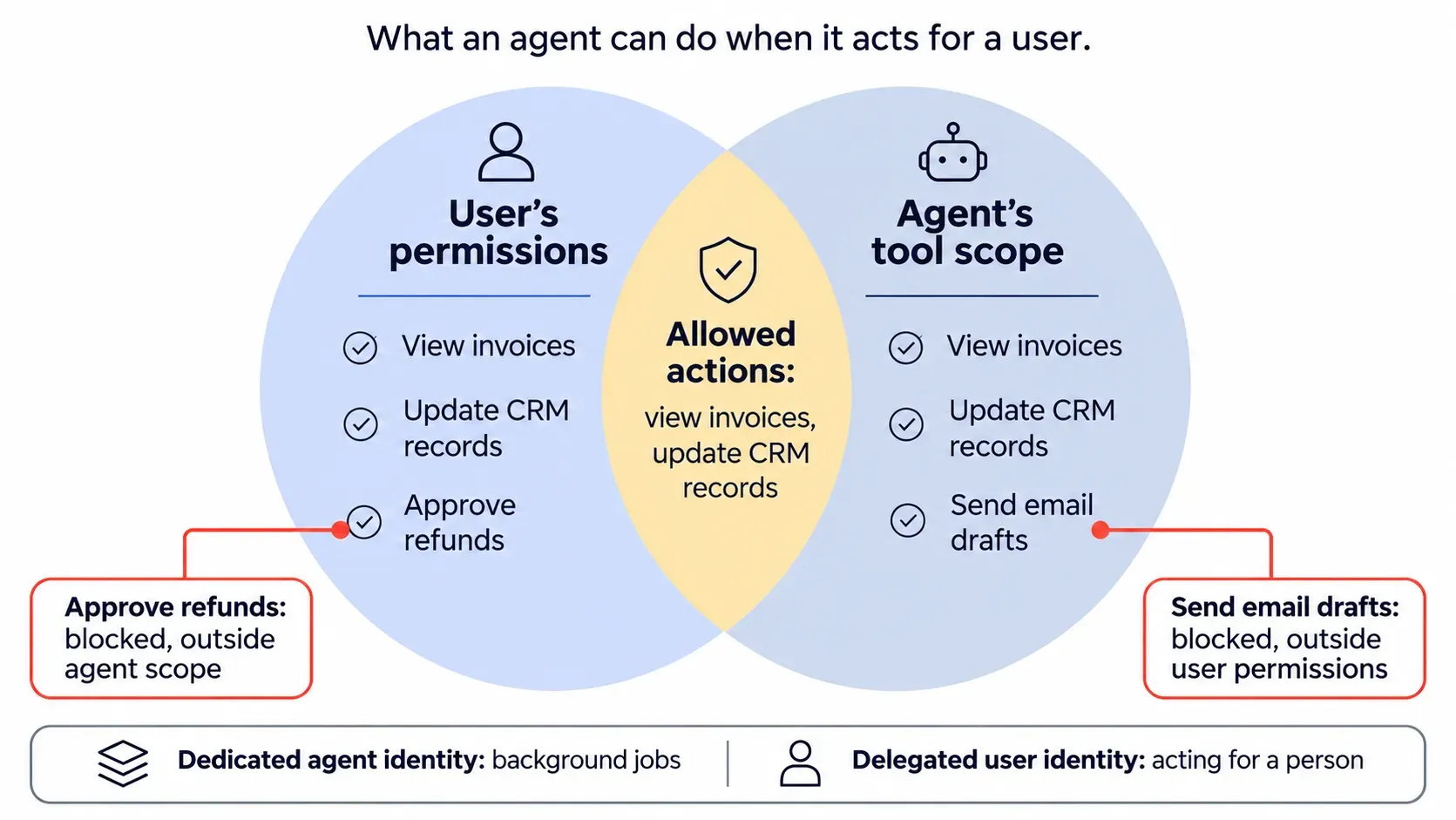
Background jobs can run under a dedicated agent identity. When an agent acts for a person, delegated access limits it to what both that person and the agent's own scope allow. A shared service account hides the real actor.
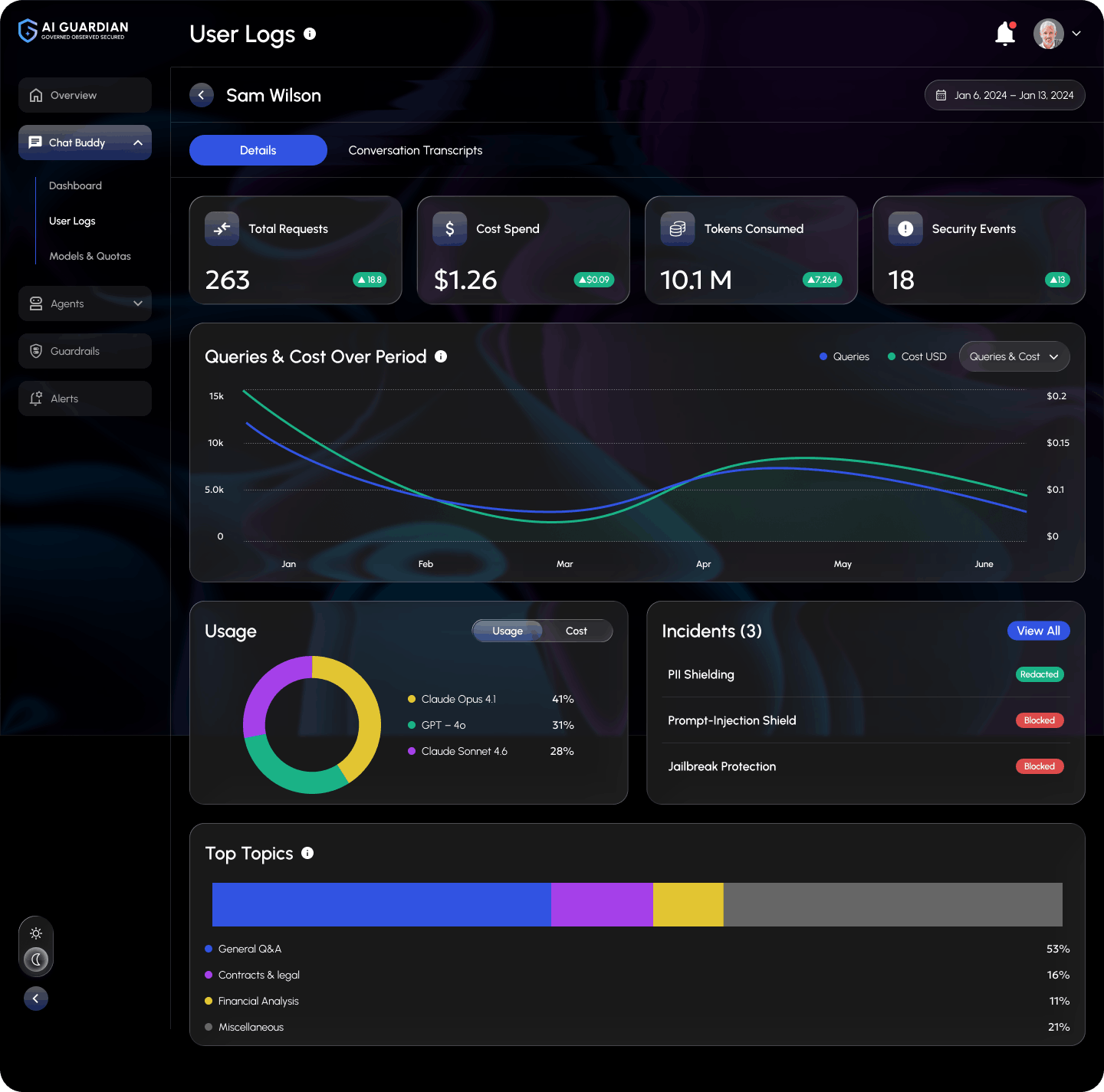
Not every integrated agent needs the same controls. Gartner has warned that applying uniform governance across AI agents will lead to enterprise AI agent failure. A read-only internal helper and an agent that posts journal entries need very different guardrails. Scale each control to what the agent can change and how freely it acts:
| Layer | Owns | Does not own |
|---|---|---|
| Integration platform | Reach, credentials, tool execution | Company-wide AI policy and spend |
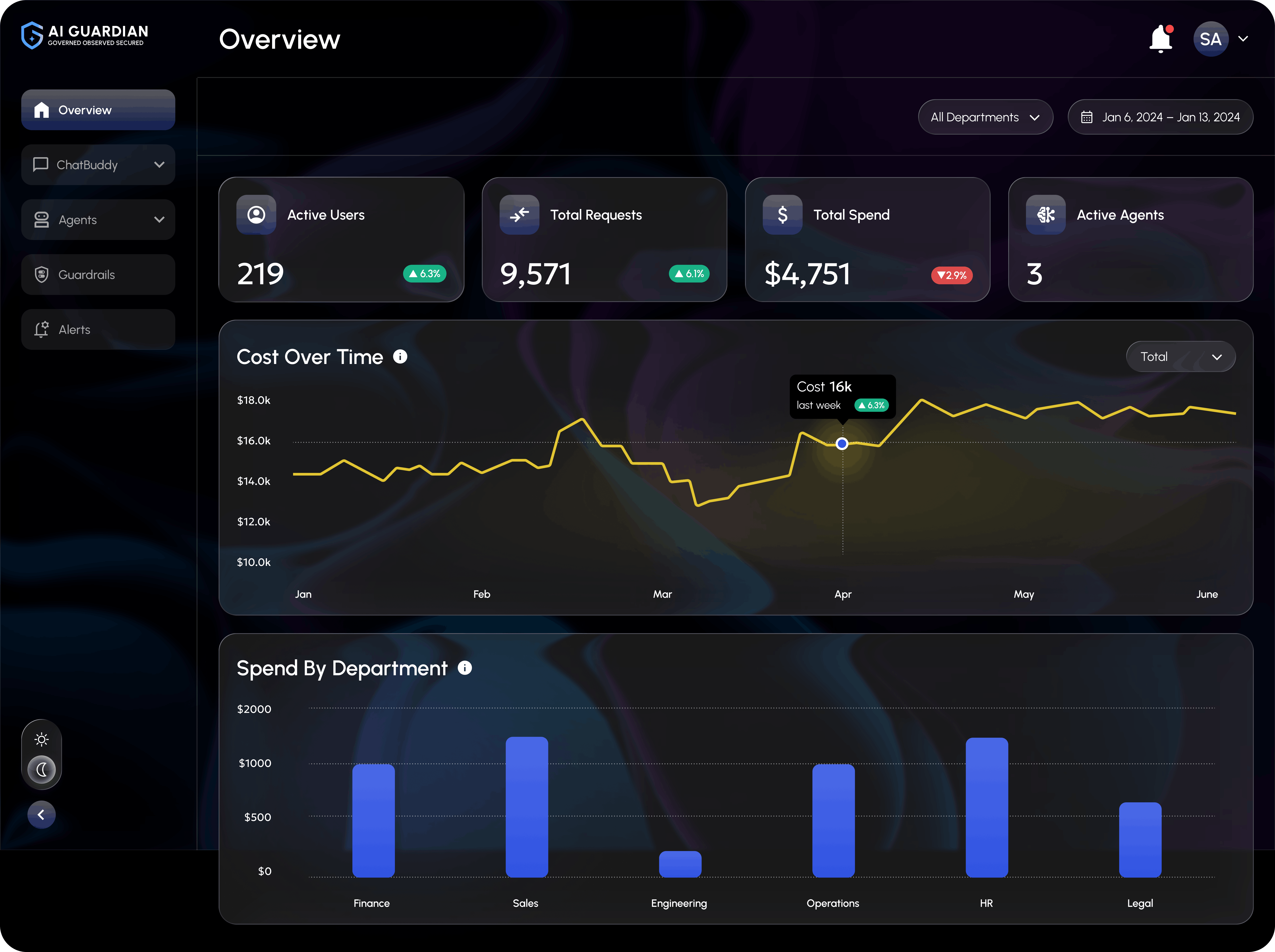
| AI Guardian | Runtime policy, redaction, routing, and audit for supported traffic routed through it | Connectors to your business apps |
| Your workflow | Human approval steps | Runtime enforcement |
Third-party agents calling tools through MCP can be governed the same way when their traffic is routed through AI Guardian. Supported agents built in Foundry or Copilot Studio can register with it. This AI guardrails platform comparison shows how enforcement points differ.
Watch a walkthrough of AI Guardian from Folio3 AI.
Every new integration adds access, data exposure, and spend. AI Guardian applies identity, redaction, policy, and audit controls to supported requests routed through it, inside your own cloud tenant.
Read and write labels miss the real question: what happens if this call goes wrong? The Folio3 Agent Action Risk Map sets the rules for each action class.
| Action class | Example | Identity | Approval | If the call fails | Log |
|---|---|---|---|---|---|
| 1. Read, low sensitivity | Search the policy wiki | Agent identity | None | Retry with backoff | Query and source |
| 2. Read, restricted | Pull a customer's invoices | Delegated user token | None; redact fields the task doesn't need | Stop, never widen access | User and records |
| 3. Write, reversible | Update a CRM field | Delegated user token | Per action at first; sample review only after error and rollback targets hold | Retry with idempotency key | Before and after values |
| 4. Write, hard to reverse | Email a customer, post a journal entry | Delegated, short-lived | Per action above a threshold | Check status before any retry | Approver and payload |
| 5. High impact | Release a payment, delete records | Not given to the agent | Human executes | Agent prepares, then stops | Full trace |
Split any tool that spans classes. A generic update_record tool can sit in class 3 and class 5 at once, so break it into narrow tools such as update_lead_status and close_account. Class 4 needs the most care: after a timeout, the action may have succeeded, and a blind retry posts the entry twice.
Check these before a build starts. Each "no" is a gap to close or a scope to cut.
These eight steps take one workflow to production, and each one feeds the next. Plan the wider rollout in an AI implementation roadmap.
Choose work with volume, clear outcomes, and a measurable baseline, such as handling time per case. Record the baseline before the build, because it becomes your ROI evidence. Remove pointless steps first, since an agent only speeds up a bad process. If every step follows fixed rules, build conventional automation instead.
Fill in one row per system. Without a sandbox, Step 7 has nowhere safe to run.
| Check | What to record |
|---|---|
| Access | REST, SOAP, database, or web interface only |
| Ownership | Who grants access and who fixes failures |
| Limits | Rate limits, batch windows, sandbox availability |
| Data | Sensitive fields and residency rules |
Assign every action to a class on the Folio3 Agent Action Risk Map. Class 5 actions leave the agent's tool list here. Consider whether class 4 actions can start as proposals that a person commits.
Identify the hardest system early, because it sets the constraints. A legacy portal may force a browser agent, and a write-heavy workflow rules out any platform without per-user tokens. Then decide deliberately whether that system belongs in the PoC or a later phase. Including it tests the real risk sooner, while deferring it proves value faster.
Record four things for each tool: its identity, exact scope, token lifetime, and who can revoke it. Enforce permissions in the source system, since a filter in agent code is easy to bypass.
Scope decides the schedule. Every class 4 action adds an approval path, a status check, and failure tests. Moving one write out of the first release can save more time than any connector choice, and it can return in a later stage.
Write narrow tools with typed inputs, then check each one:
Treat each pass condition as a release gate.
| Test | Pass condition |
|---|---|
| Timeout after a write | Agent checks status before retrying |
| Expired token | Agent refreshes or stops |
| Malformed data | Agent rejects the record and reports it |
| Injected instructions in a ticket | No tool call follows the hidden text |
| Revoked user permission | Access ends on the next call |
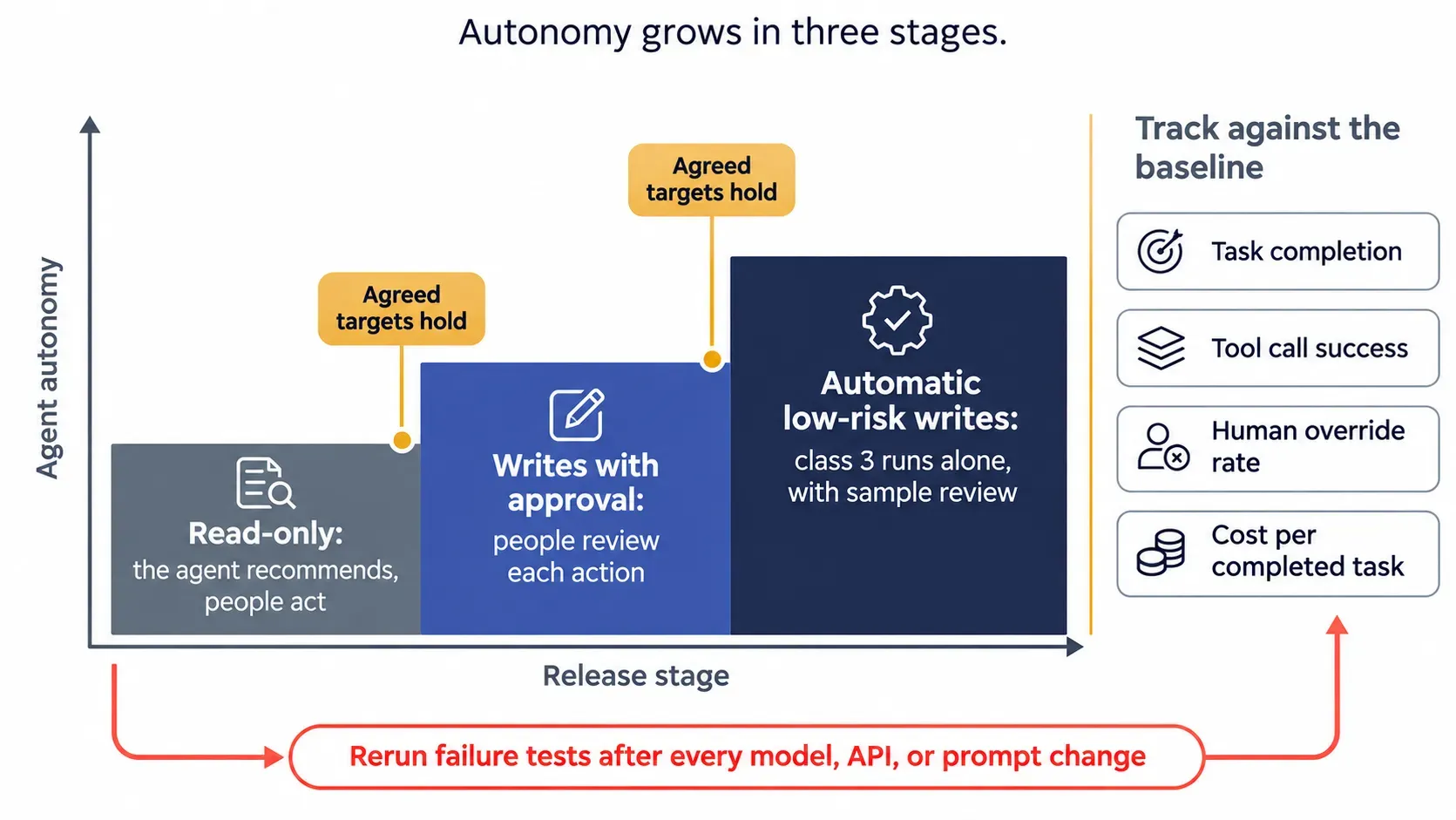
Release in stages, and move on only when agreed targets hold:
Track task completion, tool call success, human override rate, and cost per completed task against the Step 1 baseline. Rerun Step 7 after every model, API, or prompt change.
The final column shows each workflow's highest action class on the Agent Action Risk Map, which sets the controls to budget for.
| Function | Workflow | Systems | Highest class |
|---|---|---|---|
| Sales | CRM lead routing | CRM, email, enrichment | 3 |
| Support | Cross-system ticket resolution | Helpdesk, billing, knowledge base | 4 |
| Finance | ERP invoice matching | ERP, email, document store | 4 |
| HR | ATS and onboarding workflows | ATS, HRIS, IT tickets | 3 |
| IT | Access requests and fixes | ServiceNow, identity provider | 4 |
| Operations | Legacy portal automation | Browser agent, ERP | 3 |
Regulated sectors go deeper: banking AI agents connect to core platforms such as Temenos, Finacle, and FIS.
Reliability comes from small decisions made tool by tool.
Platforms sell connectors, while AI agent integration companies sell the design and upkeep around them.
Folio3 AI plans, builds, and governs integrated agents, so one team covers the connections and the controls around them.
AI agent development services from Folio3 cover the full build:
Experience across business systems: Salesforce, SAP, ServiceNow, and custom REST APIs.
Track record: 20+ years of engineering, 950+ projects delivered, and ISO 27001 company certification.
One team: the people who build your agents also govern them with AI Guardian.
Choose the build method: Folio3 develops the solution, or forward-deployed engineers work inside your team. The ranges below are typical engagement durations. Actual timing depends on scope, system access, and internal approvals.
| Stage | Typical engagement range |
|---|---|
| PoC sprint | 2 to 4 weeks |
| MVP build | 2 to 4 months |
| Business rollout | 6 to 12 months |
"The connector is usually the easy week. The slow work is deciding what an agent does when an API times out after a payment post. Those failure rules get written before the tool does, because that is where production agents earn trust or lose it."
Test one integrated agent on real systems, typically in two to four weeks. You get evidence on feasibility, risk, and value before you commit a production budget.
A capable model with no system access produces drafts. Keep fixed-rule work in conventional automation, pick the pattern before the platform, and govern each tool by what its failure would cost. Then start with one scoped workflow and a baseline to beat.
It connects an agent to business systems so it can read data, propose changes, and take approved actions. Governance is the separate layer that controls identity, permissions, and logging around those calls.
Through APIs, MCP servers, unified APIs, workflows, or browser automation. Retrieval supplies context, and tools carry out actions.
It is managed software that gives agents authenticated access to third-party tools. It handles connectors, tokens, and execution.
MCP is an open protocol for discovering and calling tools, with a maturing authorization model. A platform is a product that may use MCP and adds managed auth and connectors. Neither defines your business approvals or policies.
API integration usually follows fixed paths. An agent often chooses tools at runtime, so it needs tighter argument validation and result checks.
When it follows the same fixed rules every time. Conventional automation is usually cheaper, faster, and easier to audit for that work.
A platform suits common SaaS apps your engineers can own. A company suits legacy systems, regulated data, and write-heavy workflows. Many teams combine both.
They map workflows, build tools and connectors, design permissions, and maintain integrations. Some also provide governance.
Yes. Teams wrap the system in a custom API or use a browser agent, which costs more to maintain.
Embed it as a chat widget or call it from your backend. Events such as form submissions can start workflows elsewhere.
Match controls to each tool's action class and autonomy. Use scoped tokens, delegated identity, approval for consequential actions, redaction where the task allows, and identity-attributed logs. Treat all tool output as untrusted.
In typical Folio3 engagements, a PoC sprint runs 2 to 4 weeks, an MVP 2 to 4 months, and a business rollout 6 to 12 months. Scope, system access, and approvals shift these ranges.
System count, API quality, write actions, and security review drive it. Folio3's AI implementation cost guide puts integration and middleware at $30,000 to $200,000.
No. A platform provides reach and credentials, while AI Guardian applies runtime policy, redaction, and audit controls to supported traffic routed through it.
Share the workflow and the systems involved. Folio3 will map the integration path, the controls it needs, and the fastest route to production.
By the Folio3 AI Editorial Team. Technically reviewed by Abdul Sami, Head of AI Development at Folio3 AI, in November 2026.
Fill the form below or Contact us at +1 408 365-4638 / email us via contact@folio3.ai
Projects Delivered
Global Employees
Companies Served
Global Awards Won

+1 408 365-4638
contact@folio3.ai

6701 Koll Center Parkway, #250 Pleasanton, CA 94566