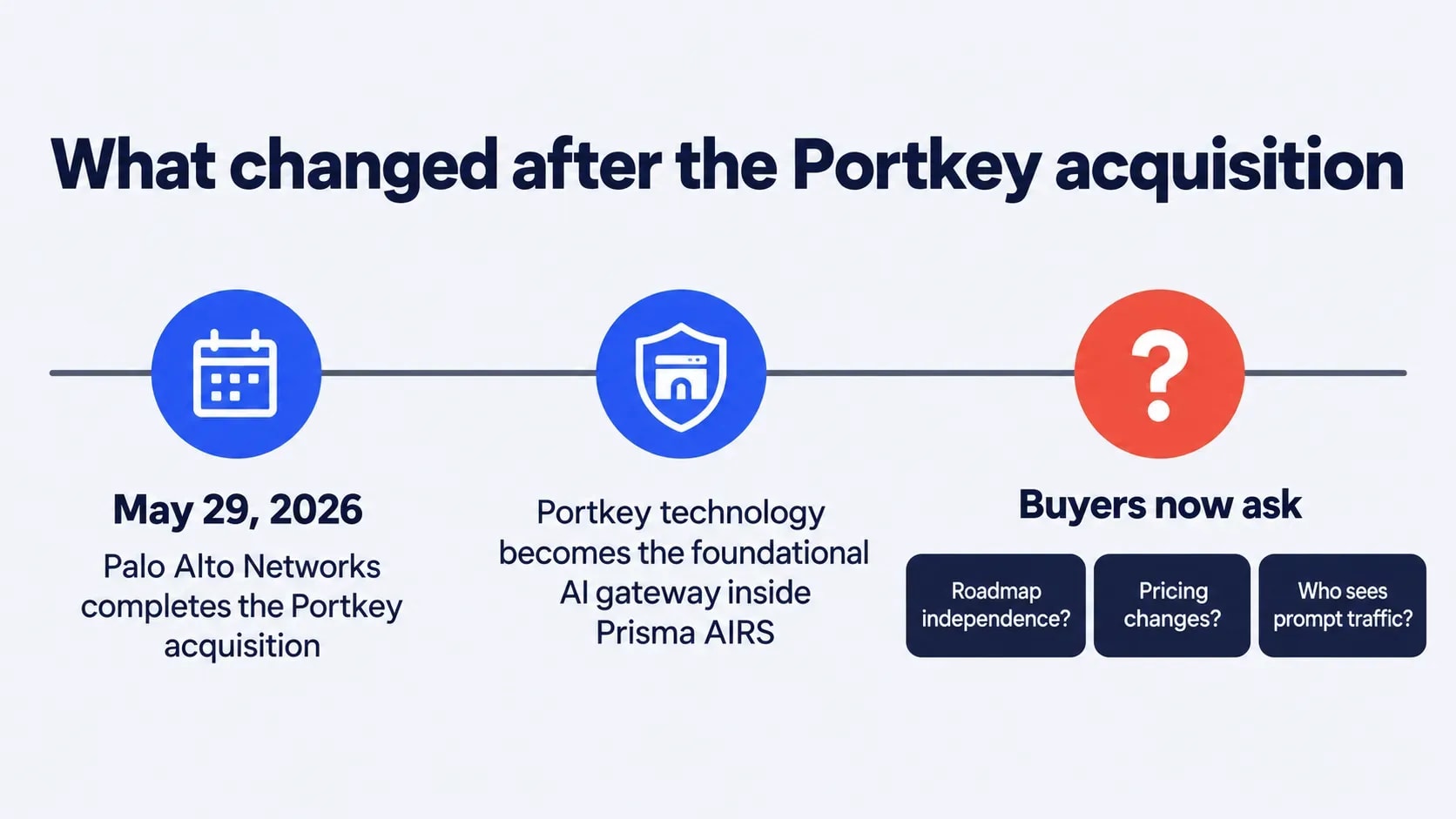
The strongest Portkey alternatives in 2026 are AI Guardian by Folio3, LiteLLM, Bifrost, Kong AI Gateway, OpenRouter, Cloudflare AI Gateway, and Helicone, and the right one depends on who owns AI decisions in your company. Palo Alto Networks completed its acquisition of Portkey on May 29, 2026, and the technology now anchors its Prisma AIRS security platform.
Portkey users now ask about roadmap independence, pricing, and who can see their prompt traffic. This guide compares all seven on governance, Model Context Protocol (MCP) coverage, deployment model, and spend control. Folio3 builds AI Guardian, one of the seven gateways compared here. Every other entry is based on public vendor documentation reviewed in October 2026, and each includes its trade-offs.
Quick answer: Platform engineers usually land on LiteLLM. Teams already on Kong stay in Kong. Security, finance, and HR leaders who need policy over every employee's AI use look at AI Guardian by Folio3.
What is the Portkey AI gateway?
Portkey is an AI gateway: one API layer between applications and model providers that handles routing, retries, caching, budgets, and observability. Applications call a single endpoint, and Portkey forwards requests to providers such as OpenAI, Anthropic, and Google while applying fallbacks, rate limits, virtual keys, and guardrails. Its open-source gateway (MIT license) can be self-hosted, and the managed platform is hosted.
Why teams leave Portkey
Four complaints come up most often in Portkey reviews and migration threads: pricing tied to logs, gateway latency in multi-call agents, the work of self-hosting, and policy that only engineers can change.
- Log-based pricing. Cost scales with recorded logs. The free Developer tier covers 10,000 recorded logs a month. Production costs $49 a month for 100,000 logs, plus $9 per extra 100,000 up to 3 million (Portkey pricing page, October 2026).
- Latency in agent workflows. Every gateway hop adds overhead, and an agent that makes ten model calls pays it ten times.
- Self-hosting effort. Running the open-source gateway means owning the servers, upgrades, and on-call rotation.
- Developer-only control. Policy lives in configs and API keys, so compliance, finance, and HR leads cannot change rules without engineering.
What changed after acquisition
Palo Alto Networks closed the deal on May 29, 2026, for total purchase consideration of $117 million, and plans to make Portkey's technology the foundational AI gateway inside Prisma AIRS. Buyers now ask three questions: does the roadmap follow the acquirer's security priorities, will pricing change, and how will prompt and log data be processed under the new owner's data processing agreement? Each justifies a structured comparison before renewal.
Portkey alternatives at a glance
The seven alternatives fall into three buying patterns: developer-owned routing, platform extensions, and business-owned governance. Details reflect public information reviewed in October 2026, so confirm pricing and feature depth in current vendor documentation before shortlisting.
Comparison table by use case
Alternative | Best for | Operating model | Governance controls | MCP position | Pricing model | Self-hosting |
Portkey (baseline) | Developer-first gateway | Hosted proxy | RBAC, SSO, budgets, guardrails | MCP gateway features | Free, $49/month Production, custom Enterprise | Open-source gateway (MIT); managed platform hosted |
AI Guardian by Folio3 | Business-wide governance | Control plane | Role and department policy, caps, audit | Governed MCP actions | Scoped proposal | Your Azure, AWS, or GCP tenant |
LiteLLM | Self-hosted routing | Open-source proxy | Virtual keys, team budgets | Built-in MCP gateway with key- and team-level tool permissions | Free open source, quoted Enterprise tier | Yes |
Bifrost | Raw throughput | Open-source proxy | Virtual keys, budgets, guardrail integrations | Built-in MCP gateway | Open source; Open source; Enterprise tier by quote | Yes |
Kong AI Gateway | Kong-based API teams | Plugins on Kong | Auth, rate limits, prompt guarding | AI MCP Proxy plugin (Gateway 3.12+, AI Gateway Enterprise) with per-tool ACLs | Free gateway, paid Konnect tiers | Yes |
OpenRouter | Simple model access | Hosted router | API keys and credit limits; SSO and policy enforcement on Enterprise | Model access only | Provider pricing plus 5.5% fee on credit purchases | No |
Cloudflare AI Gateway | Cloudflare stacks | Edge proxy | Caching, rate limits, analytics | Model traffic | Core features free on all plans; persistent log storage limits vary by plan | No |
Helicone | Lightweight observability | Proxy or async logging | Logging, caching, rate limits | Observability only | Free 10,000 requests, Pro $79/month plus usage-based overage | Yes (Apache 2.0, fully open source) |
7 best Portkey alternatives
AI Guardian comes first because it solves a different problem than the six developer-focused gateways that follow.
1. AI Guardian by Folio3
AI Guardian is a governance control plane that gives every employee one approved path to every model and agent. A proxy only forwards traffic, while a control plane also owns identity, policy, and audit for each request. It suits companies where security, finance, HR, and business heads all have a say in AI use, and where shadow AI is already a live risk. The AI gateway solution page covers the full platform.
Governance control plane, not proxy
Every sanctioned request routes through AI Guardian. Pair it with network egress rules that block unapproved model endpoints, and no employee traffic reaches a model outside policy.
- One policy layer. Routing, guardrails, and quotas apply to every user on every request.
- One console. Spend, usage, and audit trails sit in a single view.
- Agents included. Agents built in Azure AI Foundry or Copilot Studio register with the same plane and inherit its identity, guardrails, and audit trail.
PII redaction before model ingress
Personally identifiable information (PII), secrets, and injection attempts are detected and masked or blocked before the prompt leaves your tenant.
- Document flow. The platform extracts text from uploads, redacts PII, and shows a sanitized preview before anything goes to the model.
- Protection set. Prompt-injection detection, secrets blocking, and off-domain enforcement run alongside redaction, with rules set by department and role.
Role-based model routing and quotas
- Role caps. Admins assign token or cost caps to a role across a department, and the change applies to everyone in that role.
- Routing rules. Model allow and block lists, policy-based routing, automatic fallback, and caching decide which model handles each request. The LLM gateway software page details the routing layer.
Private Azure deployment
AI Guardian deploys into your own Azure tenant, so prompts, responses, and logs stay inside your subscription and region. Data is encrypted in transit (TLS 1.2+) and at rest [confirm key management: platform-managed or customer-managed keys], and each customer runs in an isolated tenant. Folio3 holds ISO 27001 certification, and AI Guardian's redaction, audit logging, and role-based access map to SOC 2, GDPR, and HIPAA control requirements; it does not currently carry a SOC 2 audit report. AWS and GCP deployments are also available, so AI Guardian can run inside your own Azure, AWS, or GCP tenant.
Teams, Slack, and web access
- Where staff work, employees reach AI Guardian inside Microsoft Teams and Slack or through a web interface, with no separate login.
- Work with approved models. Staff use approved models for drafting, analysis, and document review, and governed agent workflows run under the requester’s identity with the same policy and audit controls.
- HRIS sync. Roles and managers from the HR information system (HRIS) feed into the access rules automatically.
Where AI Guardian falls short
- Azure first. Azure is the only live platform today, and rollout starts with discovery and a scoped proposal, so a developer testing a gateway this afternoon will move faster with LiteLLM or OpenRouter.
- Small teams. A four-person team shipping one chatbot has little use for department consoles and HRIS sync.
Outgrowing Portkey? Let's Find the Right Fit
Walk us through your models, compliance needs, and deployment setup, and we'll give you a clear view of which AI gateway suits your team best.
Get a Free Gateway Consultation
2. LiteLLM for self-hosted routing
LiteLLM is an open-source Python proxy that exposes one OpenAI-compatible API over more than 100 providers, according to its documentation. Platform teams use it for virtual keys, per-team spend tracking, fallbacks, and YAML-defined routing inside their own infrastructure. Its built-in MCP gateway exposes MCP server tools to any model routed through the proxy, with key- and team-level permissions. Best for platform teams that want full control of the data path and have the on-call capacity to match.
Watch for: Your team runs, patches, and scales the proxy and its database, and governance beyond keys and budgets needs extra tooling.
3. Bifrost for raw throughput
Bifrost is an open-source gateway written in Go by Maxim AI. It bundles an LLM gateway, an MCP gateway, and an agents gateway, with guardrail integrations such as AWS Bedrock Guardrails, Azure Content Safety, and Patronus AI. Its pitch is low gateway overhead. Best for high-volume inference where proxy latency shows up in the error budget.
Watch for: Overhead figures come from the vendor, so run your own load test on your own network path before committing.
4. Kong AI Gateway for APIs
Kong AI Gateway adds AI plugins to the Kong API gateway: multi-LLM routing, semantic caching, prompt guarding, and token-based rate limiting. Companies already running Kong reuse the authentication and traffic policy they have. Its AI MCP Proxy plugin (Gateway 3.12 or later) applies ACLs to both tool discovery and tool invocation. Best for API-led organizations with a mature Kong practice.
Watch for: The open-source gateway is free, but AI features, including MCP governance, expand under paid Konnect and AI Gateway Enterprise tiers, and the platform assumes Kong operations skills.
5. OpenRouter for simple model access
OpenRouter gives one OpenAI-compatible API to hundreds of models. It passes through provider pricing and charges a 5.5% fee ($0.80 minimum) on credit purchases. Bring-your-own-key usage is free for the first 1 million requests a month, then 5%. Best for prototypes, solo developers, and small teams that only need model access.
Watch for: It is hosted only and built for model access rather than department policy, so compliance teams should check role policy, PII redaction, and audit evidence before adopting it.
6. Cloudflare AI Gateway for edge
Cloudflare AI Gateway runs on Cloudflare's edge network and provides caching, rate limits, and request analytics for providers such as OpenAI and Anthropic. Its core features are free on all plans. Best for Cloudflare-native stacks.
Watch for: Persistent log storage is capped by plan, and governance beyond caching and rate limits has to come from other tools, so treat it as a lightweight proxy layer.
7. Helicone for lightweight observability
Helicone is an open-source, proxy-based observability tool with request analytics, cost breakdowns, caching, and rate limits. The free Hobby tier covers 10,000 requests. Pro costs $79 a month for 10,000 requests plus usage-based overage, and Team costs $799 a month. Best for debugging-first teams that want visibility without a full gateway.
Watch for: Mintlify acquired Helicone in March 2026 and moved the hosted product into maintenance mode: security fixes and new-model support continue, but feature development has stopped. The open-source version remains self-hostable under Apache 2.0.
Portkey vs AI Guardian
Portkey targets developers calling model APIs. AI Guardian targets companies that want every employee using AI inside policy. The table below compares the two on who buys, who controls policy day to day, where data runs, and how spend is held in check.
Decision factor | Portkey | AI Guardian by Folio3 |
Built for | Developers calling model APIs | Companies that want every employee using AI inside policy |
Typical decision maker | Head of engineering | CISO or central AI office |
What you get | Gateway for routing and screening API traffic | Control plane with employee interface, RAG, MCP actions, and governance |
Employee assistant | Built separately | Included in Microsoft Teams, Slack, and web |
Who owns daily control | Engineers, through configs and keys | Super Admins and line-of-business heads, through a console |
Policy setting | Routes and budgets defined in code or config | Policy by department and role, with HRIS sync to the org chart |
Deployment | Open-source gateway can be self-hosted; managed platform is hosted | Runs inside your own cloud tenant |
Data residency | Confirm data-handling terms under Palo Alto ownership | Data stays in your tenant's cloud region; residency follows your region choice |
Cost control | Routing and spend tracking across providers | Role-level token and cost caps, model allow and block lists, per-team accountability |
Best when | Developers build the app, the team knows the SDK, and no one needs HRIS-driven governance | Business owners need to set and audit AI policy without engineering tickets |
Expert insight
"The question is no longer which gateway has the cleanest SDK. It is which one lets security, finance, and HR see and shape AI usage without filing a ticket with engineering."
Abdul Sami
Head of AI Development, Folio3 AI
Which alternative fits your team
Pick by who owns AI decisions and what you already run. The three profiles below cover most buyers, while OpenRouter, Cloudflare, and Helicone suit narrower needs such as prototyping, edge caching, or observability.
LiteLLM suits teams with the capacity to run their own proxy.
- Why it fits: it supports more than 100 providers, with virtual keys, per-team spend tracking, and full control of the data path.
- Watch for: Your team patches and scales the proxy and its database, and governance beyond keys and budgets needs extra tooling.
Teams already running Kong.
Kong AI Gateway is the shortest path for API-led organizations.
- Why it fits: existing authentication and rate-limit policies carry over, and AI plugins add semantic caching and prompt guarding.
- Watch for: AI features expand under paid Konnect tiers, and the platform assumes Kong operations skills.
Business-wide AI governance needs
AI Guardian fits when security, finance, HR, and business heads all need a say in AI use.
- Why it fits: role-based routing, PII redaction, and HRIS-synced access make non-engineering adoption auditable and policy-bound. The AI risk management software page covers the audit side.
- Watch for: Azure is the only live platform today, and rollout starts with a scoped proposal rather than self-serve signup.
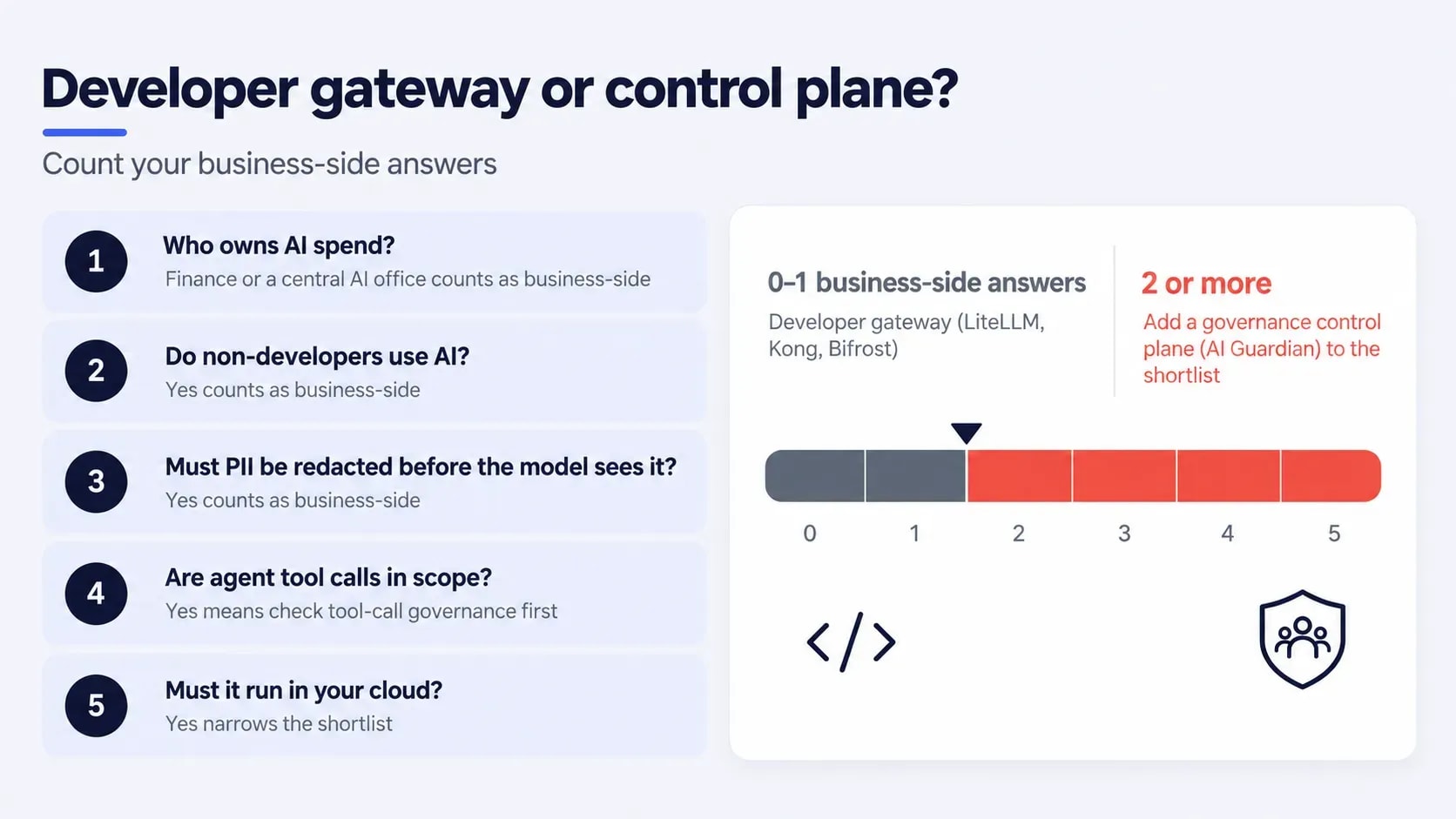
Five-question gateway decision test
Answer these five questions before any vendor demo to see whether the real buyer is engineering or the business.
- Who owns AI spend? Engineering points to a developer gateway. Finance or a central AI office points to role-based quotas and chargeback.
- Do non-developers use AI? If yes, the gateway needs a Teams or Slack surface and policy that works without reading documentation.
- Must PII be redacted before the model sees it? If yes, a proxy that forwards raw prompts is not enough. You need pre-model redaction.
- Are agent tool calls in scope? If workloads use MCP or agent frameworks, check tool-call governance before anything else.
- Must it run in your cloud? If yes, shortlist AI Guardian, LiteLLM, Kong, Bifrost, and self-hosted Helicone.
Two or more business-side answers put a control plane on the shortlist.
How to evaluate a gateway
Run every shortlisted candidate through the same seven checks on your real traffic and policies. A one-week proof of concept beats a vendor-filled feature matrix.
Step 1: Operating model and deployment
Decide between a proxy, a control plane, and an API gateway extension, then between hosted, self-hosted, and your own cloud tenant. This choice fixes who patches the system and where prompts are processed. See LLM gateway software for the control-plane model.
- Test. For each candidate, name who patches it, who carries the on-call rotation, and where prompts and logs are processed.
- Pass if. The owner and the processing location are stated in writing, not assumed.
Step 2: Gateway overhead and latency
- Test. Replay your real workload through each candidate and a direct provider call, then compare median and tail latency. Vendor-run benchmarks are best-case.
- Pass if. Overhead stays acceptable across a full multi-call agent run, not only a single request.
Step 3: Guardrails and PII controls
Ask where redaction happens: before the model call or after. Redaction after the call has already exposed the data.
- Test. Send seeded PII, a fake secret, and an injection prompt, and review documented AI agent failure incidents to design more cases.
- Pass if. Sensitive values are redacted or blocked before the request leaves the gateway.
Step 4: Spend caps versus tracking
- Test. Set a low cap and exceed it on purpose.
- Pass if. The next call is blocked and an alert fires. If only a dashboard shows the overage, you have tracking, not a cap.
Step 5: Audit trails and compliance evidence
- Test. Pick a date, a user, and a model, then request the prompt, response, cost, and guardrail events. Check security information and event management (SIEM) or CSV export, and use the AI governance and compliance readiness guide to map evidence to your frameworks.
- Pass if. The answer arrives in minutes, every record is tied to a named identity, and it exports cleanly.
Step 6: Model, agent and MCP coverage
Check the provider list and the depth of agent and MCP support in current documentation, not the marketing page. The guide to multi-agent system builders shows what agent workloads demand, and you can see how legal and insurance AI agents handle tool-call auditing in regulated workflows.
- Test. Run one real tool call through each gateway.
- Pass if. Policy applies to the tool call, not only to the model call.
Step 7: Log retention and pricing
- Test. Request retention defaults, export formats, and a price quote at several times your current traffic.
- Pass if. Retention, export, and exit terms are in writing before you sign.
Vendor risk after acquisitions
Portkey's move from independent startup to a security vendor's platform shows how ownership change can reshape a gateway's roadmap, pricing, and data terms. Treat it as a formal evaluation criterion.
Roadmap independence
What to ask: Who sets the roadmap, customers or the parent company? Request the changelog for the last two quarters and compare release cadence before and after the deal.
Red flag: Releases slow down, or new features appear only inside the acquirer's bundle.
Pricing change protection
What to ask: Get price-lock terms in writing, such as no increases for 24 months after an ownership change.
Red flag: Free tiers, log limits, or retention windows shrink at renewal.
Data handling and residency
What to ask: Reread the data processing agreement after any acquisition. Confirm the sub-processors and where prompts and logs are stored.
Red flag: New sub-processors or a changed storage region arrive without a notice period.
Config export and exit
What to ask: Can you export routes, policies, and logs in a format another gateway can read? Test the export before you need it.
Red flag: The export covers logs only, so you rebuild every policy by hand.
Cloud and model neutrality
What to ask: Does the gateway perform equally across every provider you use? Hyperscaler, security-vendor, and model-provider owners carry priorities you may not share.
Red flag: Guardrails, caching, or cost tracking work on the owner's preferred models but lag on rival providers.
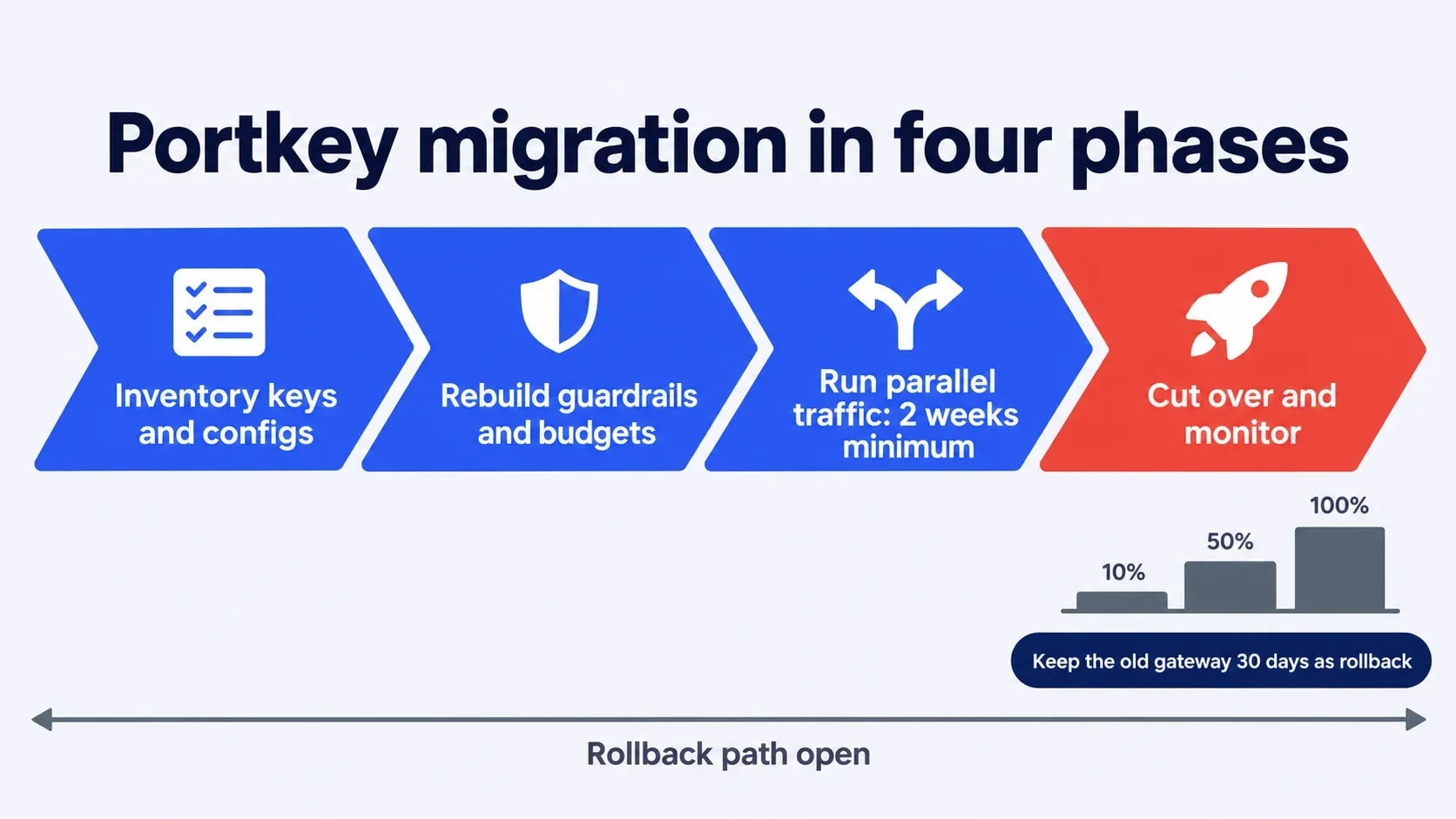
Four-phase Portkey migration plan
Move in phases and keep a rollback path open until the new gateway has handled real traffic.
Phase 1: Inventory keys and configs
List every API key, route, fallback chain, budget rule, and custom header, plus the owner of each.
Phase 2: Rebuild guardrails and budgets
Recreate policies in the new gateway before production traffic touches it. Migrate policy and traffic separately so any failure has one cause.
Phase 3: Run parallel traffic
Mirror production requests to the new gateway without serving its responses. Compare latency, error rates, guardrail hits, and cost for at least two weeks.
Phase 4: Cut over and monitor
Shift traffic in stages: 10 percent, 50 percent, then 100 percent. Keep the old gateway running for 30 days as a rollback path.
How Folio3 AI can help
Folio3 AI deploys AI Guardian for companies that need one governed path to every model and agent. Work starts with a discovery session on current AI usage, shadow AI exposure, and compliance needs. A scoped proposal with timeline and pricing follows, then go-live in your Azure tenant within 4 to 5 business days after the proposal is signed for a single-department rollout.
An AI Gateway That Keeps Your Data Inside Your Cloud
See how AI Guardian enforces role-based access, masks sensitive data before it reaches a model, and controls spend by team, all deployed in your own Azure or AWS environment.
Book an AI Guardian Demo
Conclusion
Gateway choice comes down to one question: who is accountable when an AI request goes wrong? If the answer is a platform engineer, LiteLLM, Bifrost, Kong, or Portkey itself will serve you well. If the answer is a CISO, a finance lead, or an HR head who cannot edit a config file, you need a control plane such as AI Guardian by Folio3. Run the seven checks on your real traffic, then book a working session with the Folio3 team to turn your current gateway setup into a shortlist and a migration plan.
FAQs
What is the best Portkey alternative?
It depends on who owns AI decisions. LiteLLM fits self-hosting developer teams, Kong fits teams already running it, and AI Guardian by Folio3 fits company-wide governance.
Who owns Portkey now?
Palo Alto Networks completed its acquisition on May 29, 2026. Portkey's gateway now sits inside the Prisma AIRS platform.
What is the difference between an AI gateway and an AI control plane?
A gateway routes and screens model traffic, usually for developers. A control plane adds identity, role-based policy, and audit so security, finance, and HR can govern every request.
Is LiteLLM a Portkey alternative?
Yes. It covers routing, fallbacks, and spend tracking behind one OpenAI-compatible API and runs in your own infrastructure.
Is there an open-source Portkey alternative?
LiteLLM and Bifrost are the most common open-source choices, and Helicone is fully open source under Apache 2.0. Portkey's own gateway is also open source under the MIT license.
How much does an AI gateway cost?
Open-source gateways are free to run, but you pay for hosting and on-call time. Hosted plans range from Portkey's $49 a month Production tier to usage-based or quoted pricing, so request a quote at several times your current traffic.
Do teams need an AI gateway at all?
Usually, yes. Once two or more providers or teams are involved, a gateway is the simplest way to centralize keys, spend caps, and audit logs. One app calling one model rarely needs one yet.
How is AI Guardian different from Portkey?
AI Guardian is a governance control plane with role-based routing, PII redaction, and HRIS-synced access. Portkey is a developer gateway focused on API-level control.
Can AI Guardian run in a private cloud?
Yes. AI Guardian deploys inside your own Azure, AWS, or GCP tenant, so policy decisions, PII masking, quotas, and audit logs stay in your account. Only the masked prompt is sent to the approved model provider, and nothing leaves your tenant if the model is hosted there too.
How long does migrating from Portkey take?
Using the four-phase plan, expect about six to eight weeks: one to two weeks to inventory and rebuild policy, at least two weeks of parallel traffic, then a staged cutover with a 30-day rollback window.